Google Docs ATS Templates
The Google Docs Resume Template That Reads Clean
Google Docs is a fine place to build a resume and a very easy place to break one. Its own Template Gallery resumes are laid out inside tables, which scramble in a parser. Here is which Google Docs layouts fail, how to build one that reads clean, and five you can copy today.
Key Takeaways
Google Docs is fine for an ATS. Its own built-in resume templates often are not, because they are laid out inside tables a parser reads cell by cell.
A table is invisible to you and obvious to the parser. That is why a Google Docs template can look spotless and still splice a skill into the middle of a job.
Building a safe one is quick. Start from a blank document, stay single column, type contact details onto the page, and never use a table or the Columns feature to lay it out.
A template removes the parsing penalty. It does not guarantee a pass. Run the downloaded file through the free checker before you apply.
- Resumes Analyzed
- 50K+
- Average ATS Score Increase
- 25%
- ATS Checks Per Full Report
- 30+
- From Upload to ATS Score
- <60s
What Makes a Google Docs Resume Template ATS-Friendly?
A single column of real text, standard headings, and contact details typed onto the page, downloaded as a .docx or a text-based PDF. That is the whole list. Google Docs handles every part of it.
So the platform was never the problem. A Google Doc downloaded to Word or a text-based PDF parses cleanly, the same as a file built in Word does.
The problem is how the template is put together. The Template Gallery resumes are built inside tables, and the moment a table, a second column, or a colored banner does the layout, the reading order breaks and the software reads your resume in an order you never intended. See the same idea in the full ATS resume format guide, then copy a template below.
Google Docs ATS Templates
Five Single-Column Layouts With No Table Underneath
Each one is filled with the same real resume so you see the look, not an empty frame. Every one is a single column of selectable text, and every one reads cleanly in Workday, Greenhouse, Lever, Taleo, and iCIMS. Pick the feel you want and rebuild it in a blank Google Doc.
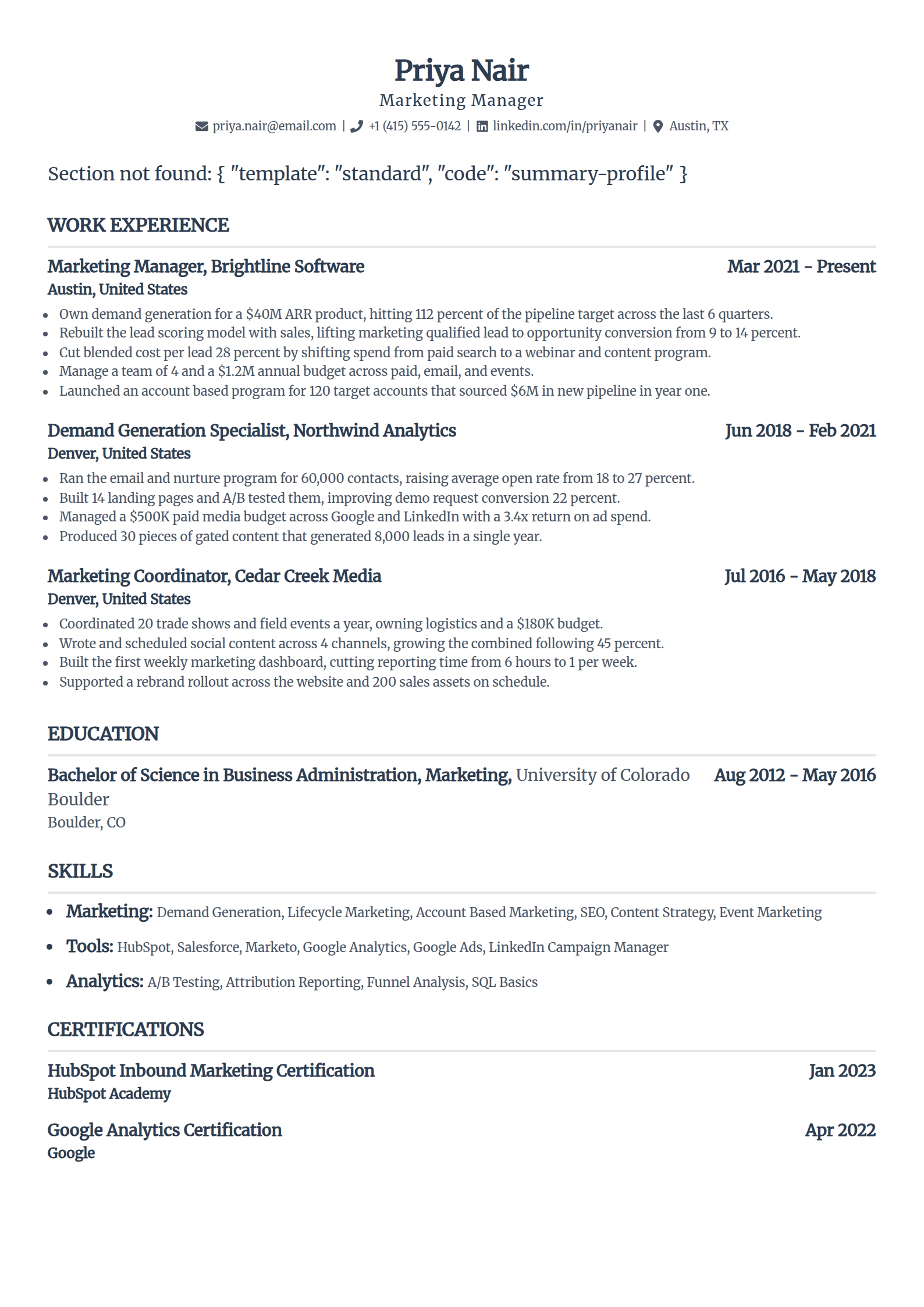
Standard
The one to copy if you want zero surprises. One column, ordinary headings, dates in line, and no table hiding under the layout.
Use the Standard template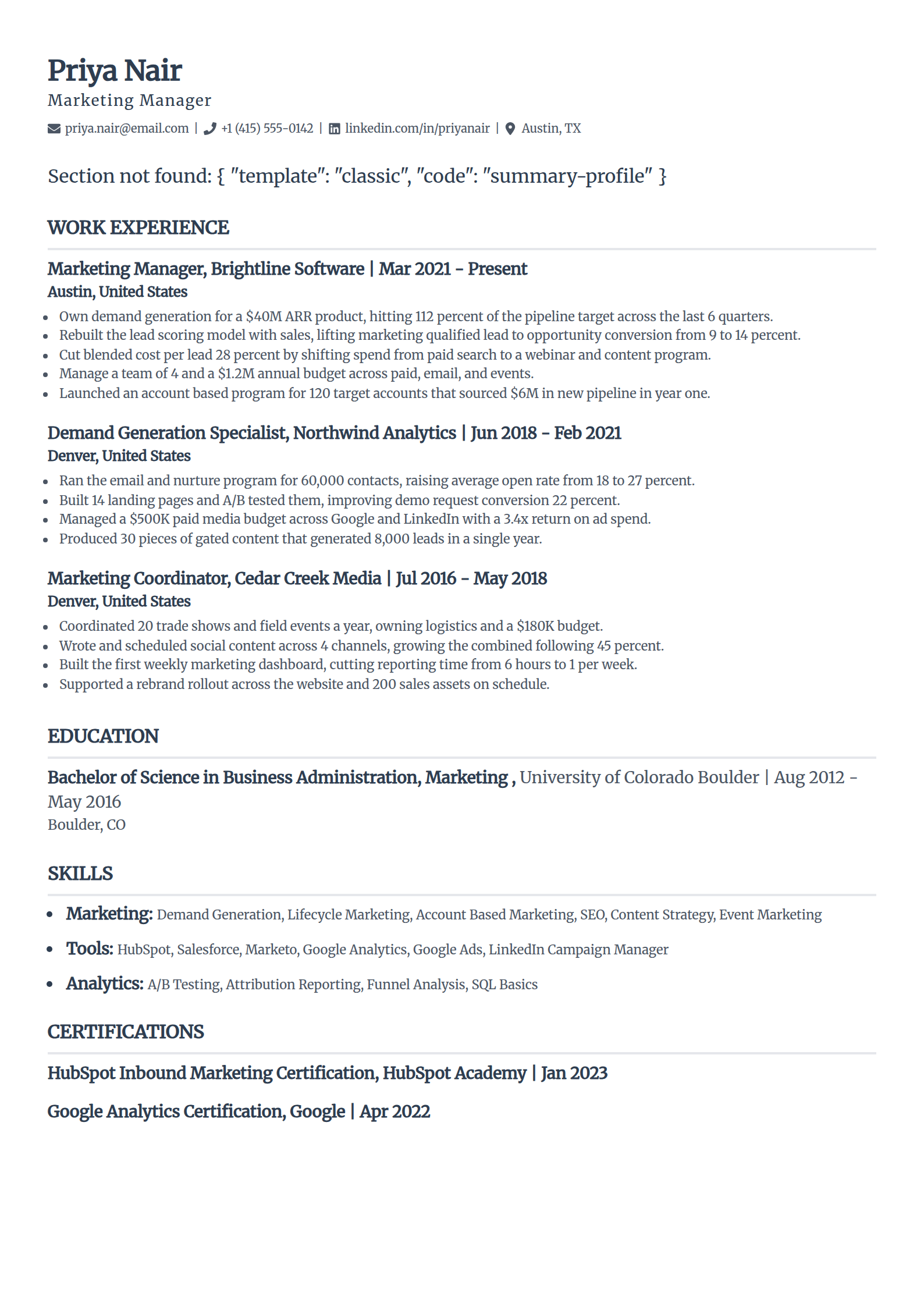
Classic
A traditional look without the traps Google's own Serif template hides. Serif headings and thin rules, every line still real text.
Use the Classic template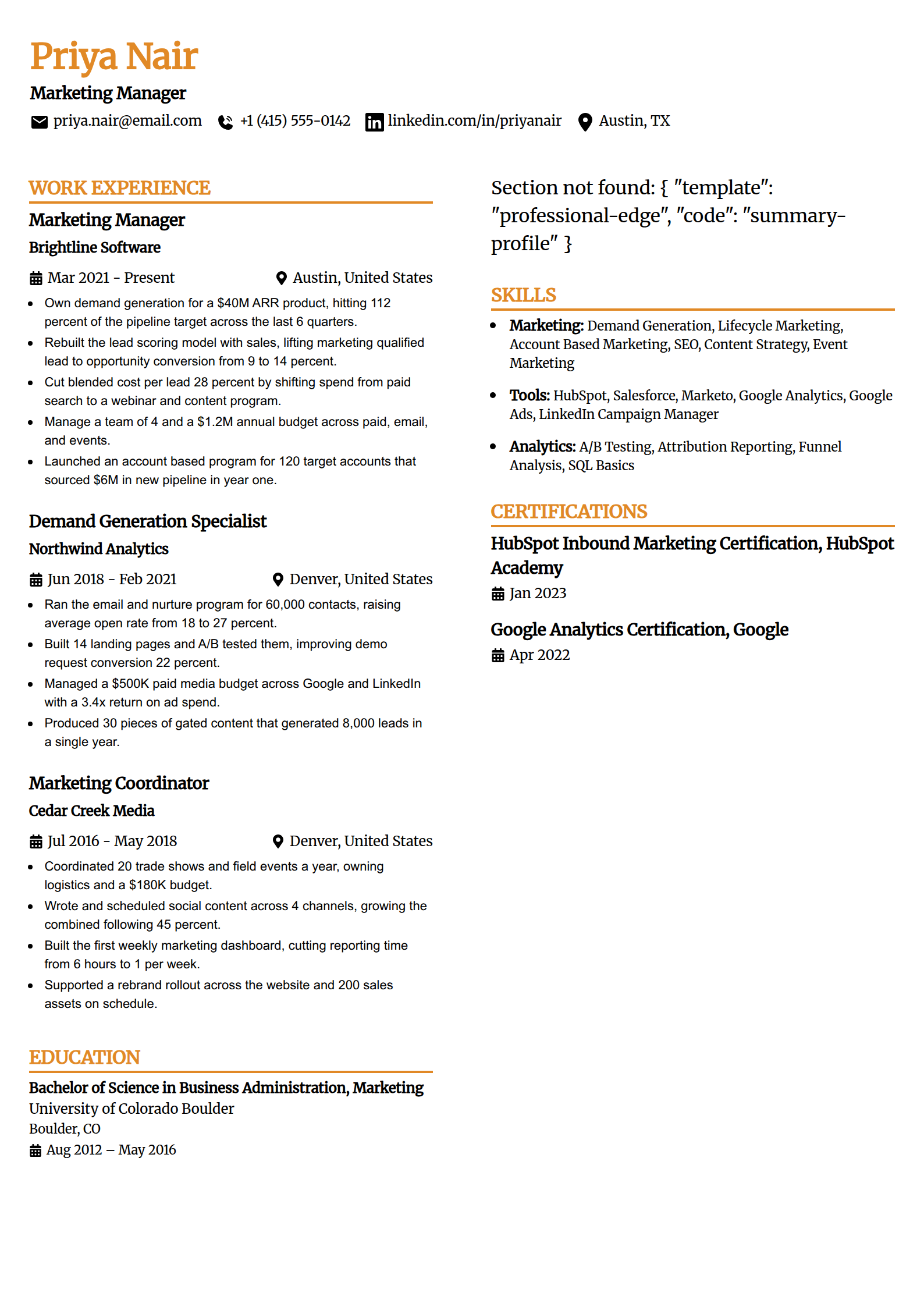
Professional Edge
A stronger header for a manager or senior role. The weight comes from type size, not a colored band a parser would drop.
Use the Professional Edge template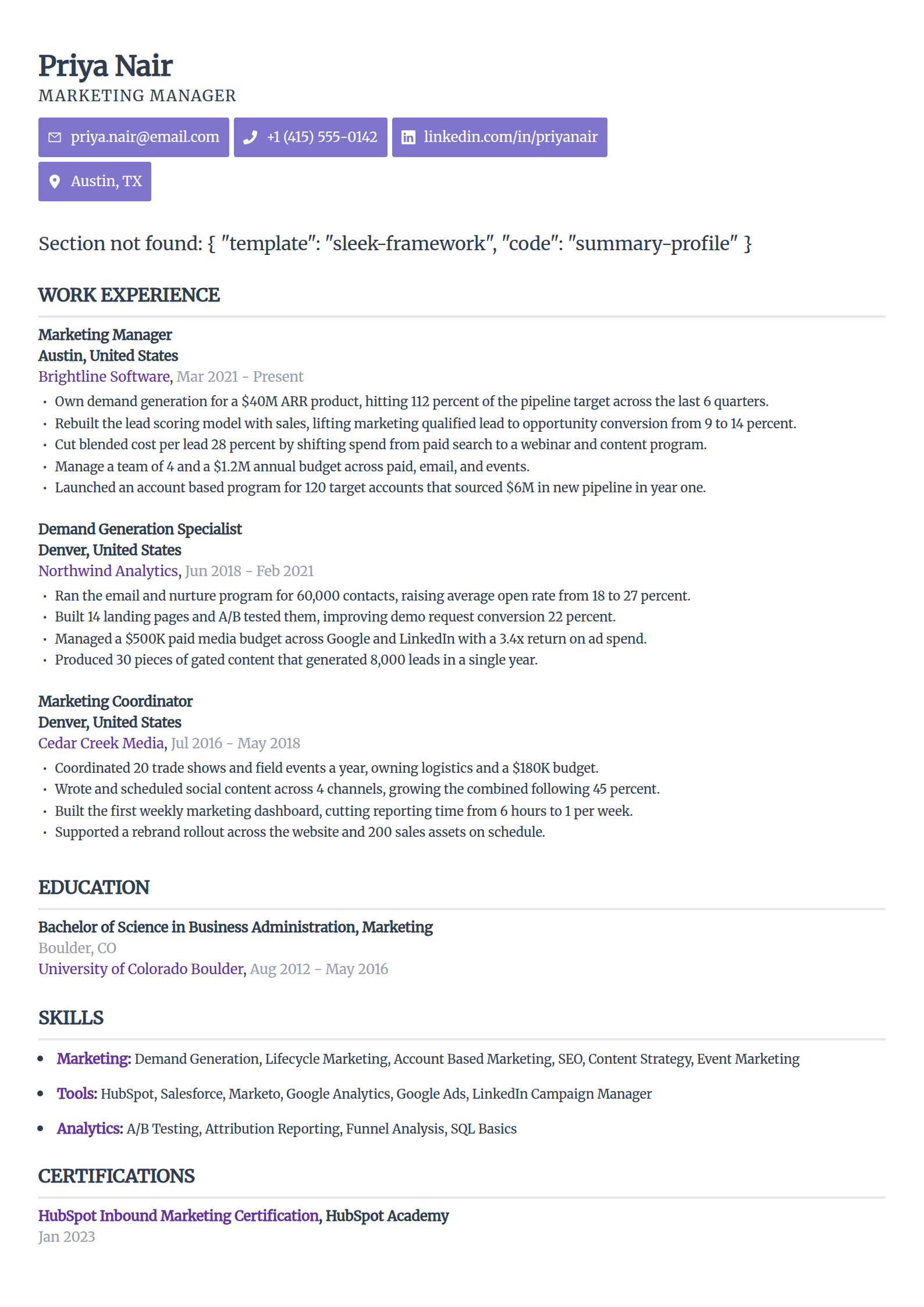
Sleek Framework
The most designed pick that still parses. Tight spacing does the work a sidebar usually would, kept to a single column.
Use the Sleek Framework template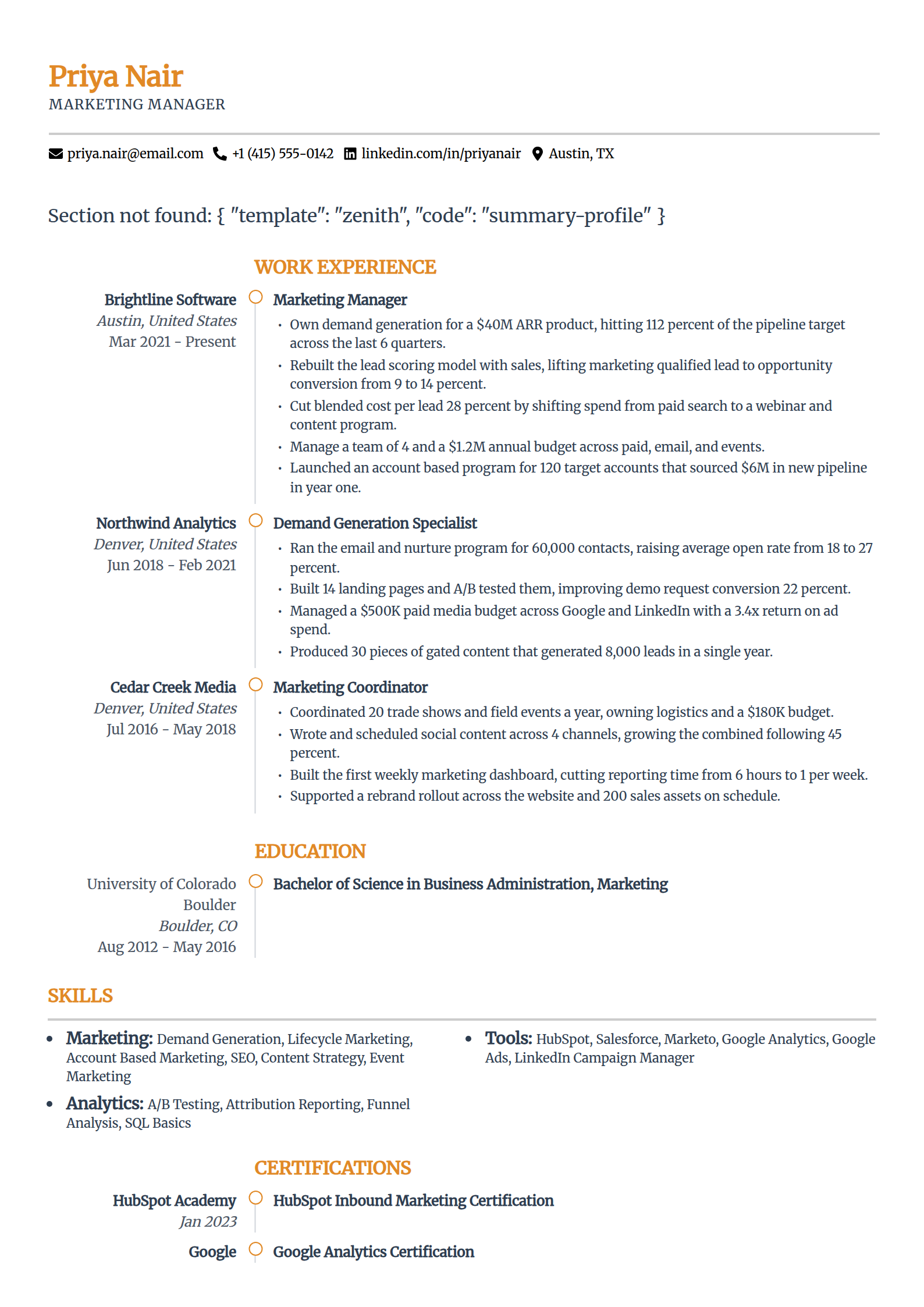
Zenith
An open, summary-first layout for a role where the pitch leads. Whitespace carries the hierarchy, nothing for a parser to trip on.
Use the Zenith templateEvery template here is free to fill and export as a text-based DOCX or PDF, with nothing to pay at download. The AI writing help and premium designs sit inside the paid builder plans; using and exporting these layouts costs you nothing at all.
Where Google Docs' Own Templates Break
Open File then New and pick a resume from the Template Gallery, and most of what you get is built inside a table. Here is what parses in a Google Doc, next to the habits that quietly break it.
Parses cleanly
- One column running top to bottom, typed straight onto the page with no table underneath it.
- Standard headings as normal text: Summary, Work Experience, Education, Skills.
- Name and contact details on the first lines of the body, not inside a colored banner.
- A common Google font at 10 to 12 point, styled with size and spacing rather than graphics.
Breaks the parse
- A table used to lay out the page, which a parser reads cell by cell so a skill lands in the middle of a job.
- The two-column arrangement in templates like Serif, read across each row instead of down the page.
- A colored header band holding the name and contact block, where the parsed contact fields often come back empty.
- Icons, rating dots, or a headshot dropped in as images, which carry no text a parser can read.
The table is the one that catches people out. It sits behind the text with its borders hidden, so the page looks like plain columns, but a parser reads it cell by cell and your resume comes apart. The full breakdown lives in why your resume should have no tables or graphics.
How to Build an ATS-Safe Resume in Google Docs
You do not need the Template Gallery to get this right. Six moves turn a blank Google Doc into a resume any parser reads in order. Follow them and you can skip the template hunt entirely.
Start from a blank document, not the Template Gallery
Open a blank Google Doc and build a single column with plain headings. The built-in resume templates under File then New are laid out inside tables, so starting clean is faster than unpicking one.
Type contact details onto the page
Put your name, email, phone, and city on the first lines as normal text. Do not use Insert Headers and footers. Contact details tucked in a header or a colored band are exactly what a parser tends to miss.
Never use a table for layout
Skip Insert Table and the two-column setup under Format then Columns. Both change the order a parser reads. Use paragraph spacing and a tab stop if you need to push a date to the right.
Use ordinary heading words
Name your sections Work Experience, Education, and Skills. Bold them and size them up if you like, but a heading like Career Story is one the software will not map to a field.
Run the highlight test
Select all the text with your cursor. Anything that will not highlight, or that sits in its own box you have to click separately, went in as a graphic or a table cell, and that reads back to the parser as blank or scrambled.
Download as .docx or a text-based PDF
Use File then Download and pick Microsoft Word or PDF. Both keep your text selectable. Never publish to the web and screenshot it, or share a link in place of a file, which hands the parser nothing to read.
For the full set of single-column templates with a per-template breakdown of who each one fits, see the ATS resume templates hub. If you build in Word too, the same teardown for that editor is in the Word ATS template guide.
Free ATS Resume Checker
A Google Doc Can Look Perfect and Still Scramble
What you see on the page is the design. It cannot show you the table hiding under it or the reading order a parser pulls out. Download the file, upload it for a 0-100 score and the 30-plus checks behind it in under 60 seconds, and read back exactly what the software took off the page.
Download It as PDF or as Word?
Match whatever the posting asks for. When it does not say, download to Microsoft Word, because older and enterprise systems read a .docx most reliably and portals auto-fill their forms from it cleaner.
A text-based PDF from Google Docs parses just as well in modern systems, and it locks your layout so nothing shifts on another machine. Either one is fine as long as the text stays selectable.
What fails is sharing a Google Docs link in place of a file, or publishing to the web and sending a screenshot, because neither hands the parser real text. Use File then Download every time. The deeper point holds across both formats: layout breaks a parse far more than the extension does, and the full comparison is in PDF or Word for ATS.
Does a Google Docs Template Guarantee It Passes?
No. A clean single-column layout clears the formatting penalty. It does not decide whether you fit the job, and it is worth saying so where most template pages let you assume otherwise.
An applicant tracking system almost never bins a resume for its layout. It parses what it can and ranks you, and a page it struggles to read simply ranks lower, where a recruiter does not scroll.
That ranking is what most employers lean on to make a first cut. In Harvard Business School's Hidden Workers study with Accenture in 2021, more than 90 percent of surveyed employers using this software relied on it to filter or rank applicants.
A file that parses keeps you in that ranking instead of buried under it.
So build the clean layout to remove the penalty. Then win on the two things that move your rank: keywords that match the exact posting, and real detail that fits the role.
The template gets you read. Your content gets you shortlisted.
Why Trust This
The Google Docs Resume Hiding a Table
A candidate once sent me a resume built from one of Google's own Template Gallery designs. On screen it looked tidy, with a slim column of skills on the left and his roles on the right.
Inside our applicant tracking system his first job read "Python, SQL, Tableau Senior Data Analyst," because the parser walked the hidden table across each row and glued the skills cell onto the job beside it. The whole layout was a borderless table he never knew was there. A plain single-column rebuild came through clean.
Google Docs was never the problem. The table under the template was, and the six checks on this page are what I look for before trusting any resume built in it.
Who wrote this
Rohith Reddy Jarugu, builder of ats resume checker. Ten years in software hiring, 500+ interviews conducted, now building career tools full time. LinkedIn
The Look Is Yours. The Proof Is a Test.
A single-column layout clears the parsing traps and stops there. Whether your download held, your keywords match, and the software reads every line is on you to confirm. It takes a minute, no signup.
ATS Resume Checker
Upload the downloaded file for a 0-100 score and a 30+ check report in under 60 seconds. The one thing a good-looking template cannot confirm for you.
Check my resumeATS Resume Parser
See the raw text a parser pulls from your file, section by section, so you catch a hidden table or a lost header before it costs you.
Preview the parseResume Keyword Scanner
Paste a posting and your resume to see the exact terms you are missing, so your wording matches the job you want.
Scan for keywordsATS Resume Templates Hub
The full set of single-column templates with a per-template breakdown of who each one fits and exactly why it parses cleanly.
See the full hubFree ATS Resume Checker
Make Sure the Download Survived the Parse
A clean layout gets you most of the way. The free checker reads the finished file the way an ATS does and shows the 30-plus checks behind your score, in under 60 seconds.
Google Docs ATS Resume Template: FAQs
The questions people ask before trusting a Google Docs template with a real application. Still stuck? Contact us and we'll help.
Are Google Docs resume templates ATS-friendly?
Some are and several are not, so the Google Docs label alone is not a guarantee. A single-column layout of real text with plain headings parses cleanly in any applicant tracking system, and a Google Doc downloaded as .docx or a text-based PDF reads fine. But Google's own built-in resume templates are laid out inside tables, and a few use a two-column arrangement or a colored header band, which break the parse no matter how clean they look on screen. Judge the layout, not the fact that it opens in Google Docs.
Which Google Docs resume templates break the ATS?
The ones built on a table, a two-column arrangement, or a colored header band that holds your contact details. Google Docs' Template Gallery resumes are laid out inside a borderless table you cannot see, and a parser reads a table cell by cell, so a skill can splice into a job line. A two-column template is read across each row rather than down the page. Contact details inside a colored banner often come back empty in the parsed fields. A template can look polished in Google Docs and come apart the moment the software reads it.
How do I make an ATS-friendly resume in Google Docs?
Start from a blank document rather than the Template Gallery, keep it to a single column, and type your contact details onto the page instead of into a header or a colored band. Skip tables and the Columns feature, use standard headings like Work Experience and Skills, and keep to a common font at 10 to 12 point. Download the finished file as a .docx or a text-based PDF, then select all the text to confirm every word highlights, which proves nothing went in as a table cell or a graphic.
Should I download my Google Docs resume as PDF or Word?
Send whatever the posting asks for. When it does not say, a .docx is the safe default, because older and enterprise systems read Word most reliably and portals auto-fill their forms from it more cleanly. A text-based PDF exported from Google Docs parses just as well in modern systems and locks your layout so nothing shifts. The one file that fails is a screenshot or an image export, which has no selectable text underneath. Use File then Download for either format, never a shared link in place of a file.
Do Google Docs' built-in resume templates use tables?
Yes. The resume templates in Google Docs' Template Gallery are laid out inside a borderless table, which is invisible on the page but very real to a parser. That is the single biggest reason a Google Docs template that looks clean can still scramble. You can check any document by clicking into the top of it and opening the Format menu to see whether a Table option becomes active, which means a table is holding the layout together.
Does a Google Docs template guarantee my resume passes the ATS?
No, and treat any template that promises it with suspicion. A clean single-column layout removes the formatting traps that break parsing, so you get read and fairly ranked. Reaching a recruiter still depends on your keywords matching the posting and your experience fitting the role. An applicant tracking system ranks and filters; it rarely auto-rejects on layout. The template lifts the parsing penalty, and testing the finished file is what proves it worked.