Resume Templates
Resume Templates Built to Parse, Not Just Look Good
An ATS-friendly resume template is a single-column layout with standard headings and real text, nothing a parser can misread. Every template here is exactly that. Big libraries leave you guessing which of their designs are safe, and plain text in one column is the layout that stays safest in any system, Workday, Greenhouse, Lever, Taleo, and iCIMS included.
Key Takeaways
An ATS-friendly resume template is a single-column layout with standard headings and real text. Nothing on the page asks the parser to guess where your information lives.
Every template on this page is exactly that: one column, no photos, no tables, no skill bars. They differ in visual tone, not in how they parse.
Same words, two layouts, one parser: the single-column file returned all three contact fields and read back in document order. The version with its contact block in the Word header returned none of them and came back shuffled, though both files still mapped every section heading.
A template removes the most common parsing traps. It does not guarantee a pass. Your headings, keywords, and file export still decide the outcome.
The only way to know a resume parses is to test the finished file. Run it through the free checker and fix what the report flags before you apply.
Four Templates, All Single-Column
Pick by look, not by risk. Each one applies in the builder and stays parser-safe while you fill it in.
Free ATS-friendly templates are included, and premium templates come with the builder plans. Not sure which to use? Each one is compared below on who it fits and what sets it apart. Applying with a CV, in the UK or abroad? See the CV vs resume rules by country further down this page.
Tested, not assumed
What Our Parser Read Back From Two Layouts
Every template store calls its files ATS-friendly. Almost none shows you a parse.
So here is one. I wrote the same resume twice as a Word file: once by the rules every template on this page follows, once with the contact block in the document header and the content inside a two-column table.
Then I ran both through the text extraction behind the free checker and the parse preview on this site.
Read cleanly
Single column, contact in the body
The rules every template on this page follows.
- Words the parser extracted
- 176 of 176
- Contact fields found
- 3 of 3: email, phone, LinkedIn
- Sections mapped by heading
- 3 of 3: Experience, Education, Skills
- Problems raised
- None
- Reading order
- Identical to the document
Lost information
Contact in the Word header, content in a two-column table
Same words, laid out the way a sidebar template lays them out.
- Words the parser extracted
- 156 of the 169 in the file
- Contact fields found
- 0 of 3
- Sections mapped by heading
- 3 of 3
- Problems raised
- 2: missing email as a failure, missing phone as a warning
- Reading order
- Shuffled: see below
The order the two-column file came back in
First line of each block, in the sequence the parser produced them.
Skills
Leadership ████████░░
Professional Summary
Education
Work Experience
Operations Manager, Cardinal Freight, Austin, TX | Mar 2021 - Present
Tools
WMS ███████░░░
Warehouse Supervisor, Lone Star Distribution, Austin, TX | Jun 2018 - Feb 2021
Education landed between the summary and the first job. The sidebar's Tools block landed in the middle of the work history, between one job and the next.
The name, the email address, the phone number, and the LinkedIn URL never appeared at all. A Word header sits outside the body text a parser reads, so nothing in it reached the extraction.
The skills fared no better. Seven skills listed as plain text in the first file came back as four words trailed by blocks of shading, which is a rating no software can read and a skills list no keyword match will ever see.
What this test does not prove
It was our parser, not theirs. Workday, Greenhouse, Lever, Taleo, and iCIMS each read a file their own way, so a clean read here is evidence rather than a promise about any of them.
I tested the layout rules, not the four files above. The two documents were built to follow and to break those rules on purpose, so the difference in the results comes from the layout alone.
Both files were .docx. Nothing in this run says anything about PDF.
One wrinkle worth reporting: in the clean file the phone came back as “512) 555-0148”, with the opening bracket clipped. All ten digits survived, and nothing else lost a character.
Run it yourself on your own file. The free parse preview shows you the same extraction, section by section, and you can compare the order it returns against the page in front of you.
How It Works
How to Use These ATS Resume Templates
No file to download, no Word margins to fight. The template is applied for you, and the layout stays parser-safe as you edit.
- 1
Pick a template
Choose the layout that fits your experience and industry. Every one follows the same parsing rules, so pick by look, not by risk.
- 2
It opens in the builder
The template is applied automatically, with standard headings and a single-column structure already in place.
- 3
Add your experience
Fill in your details section by section. AI writing help with wording and keywords is part of the premium builder plans.
- 4
Verify it passes, free
Run the finished resume through our free ATS checker for an instant score, no signup needed, and fix anything that fails.
Which Template Should You Pick?
All four parse the same. The differences are visual tone and how your experience reads at a glance, so choose by career stage and industry.
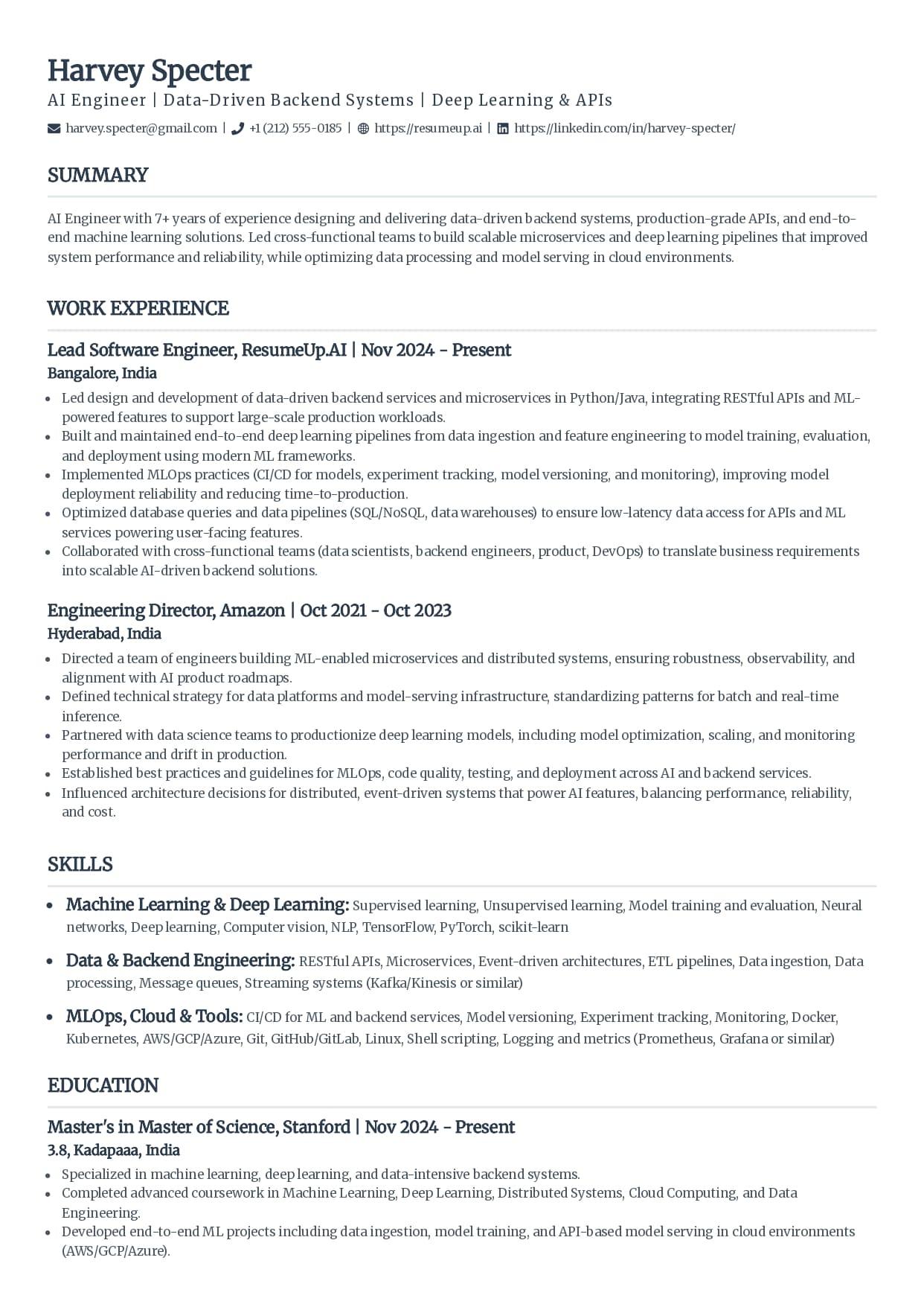
Classic
The layout most recruiters have read thousands of times: your name and title at the top left, uppercase serif headings with a thin rule under each, and everything in one column of real text. Nothing about it asks the ATS or the recruiter to work out where your information lives.
Best for
Experienced professionals in traditional industries like finance, law, healthcare, and operations
Applications to large companies where a resume must survive both the ATS and a fast human skim
Anyone who wants the safest possible layout with zero formatting risk
Why it parses: A single column means the ATS reads your resume top to bottom in the exact order you wrote it.
Use the Classic template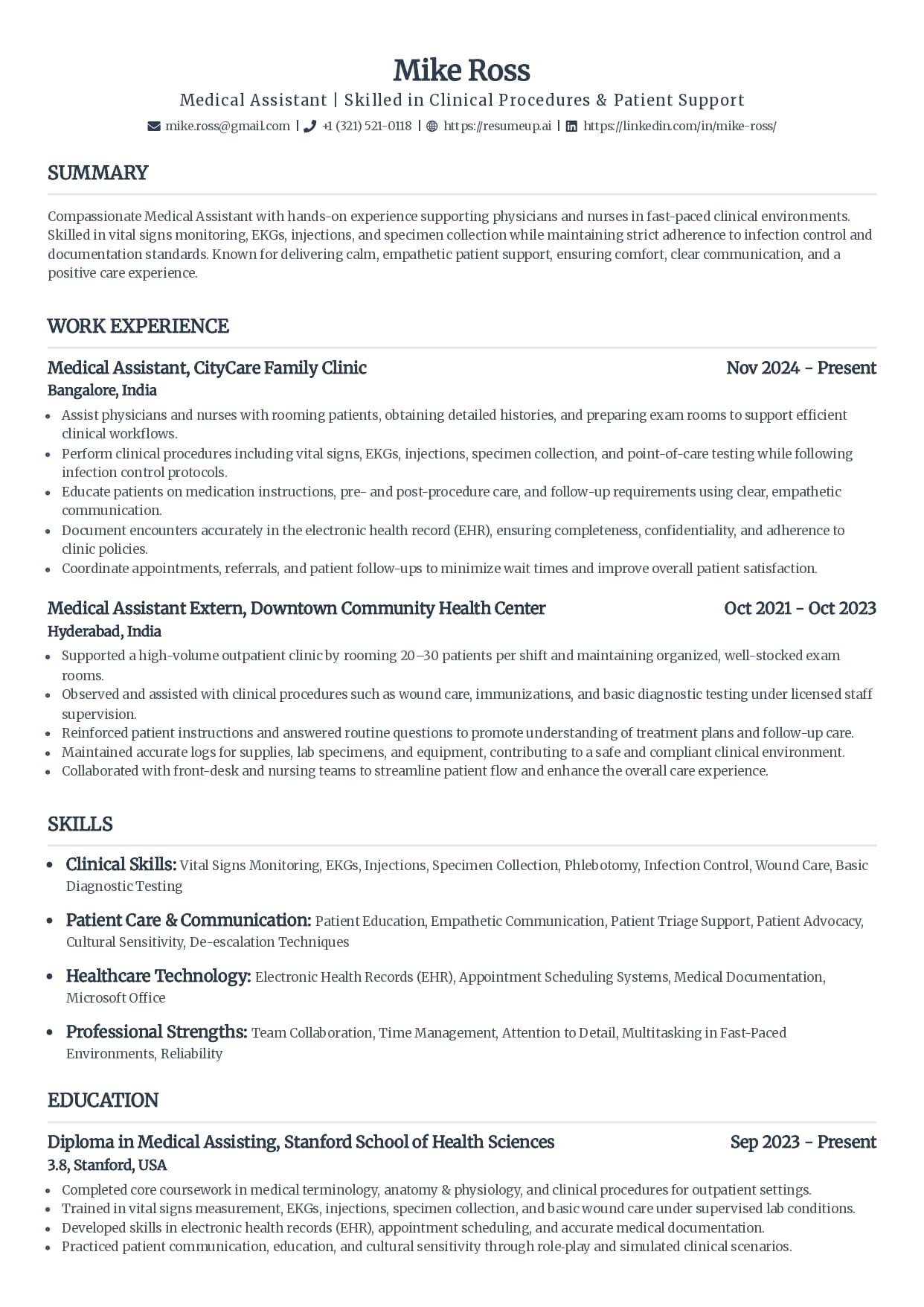
Standard
A centered name, right-aligned dates, and every section in one column under the headings ATS software expects. It reads a touch more formal than Classic while staying just as safe to parse.
Best for
Mid-career applicants who want a formal, balanced page without decoration
Roles in administration, education, and healthcare where a conventional look reads as credible
Resumes with several positions, since the right-aligned dates make the timeline easy to scan
Why it parses: Dates sit on the same line as each role in a consistent format, so the ATS builds your work timeline without gaps.
Use the Standard template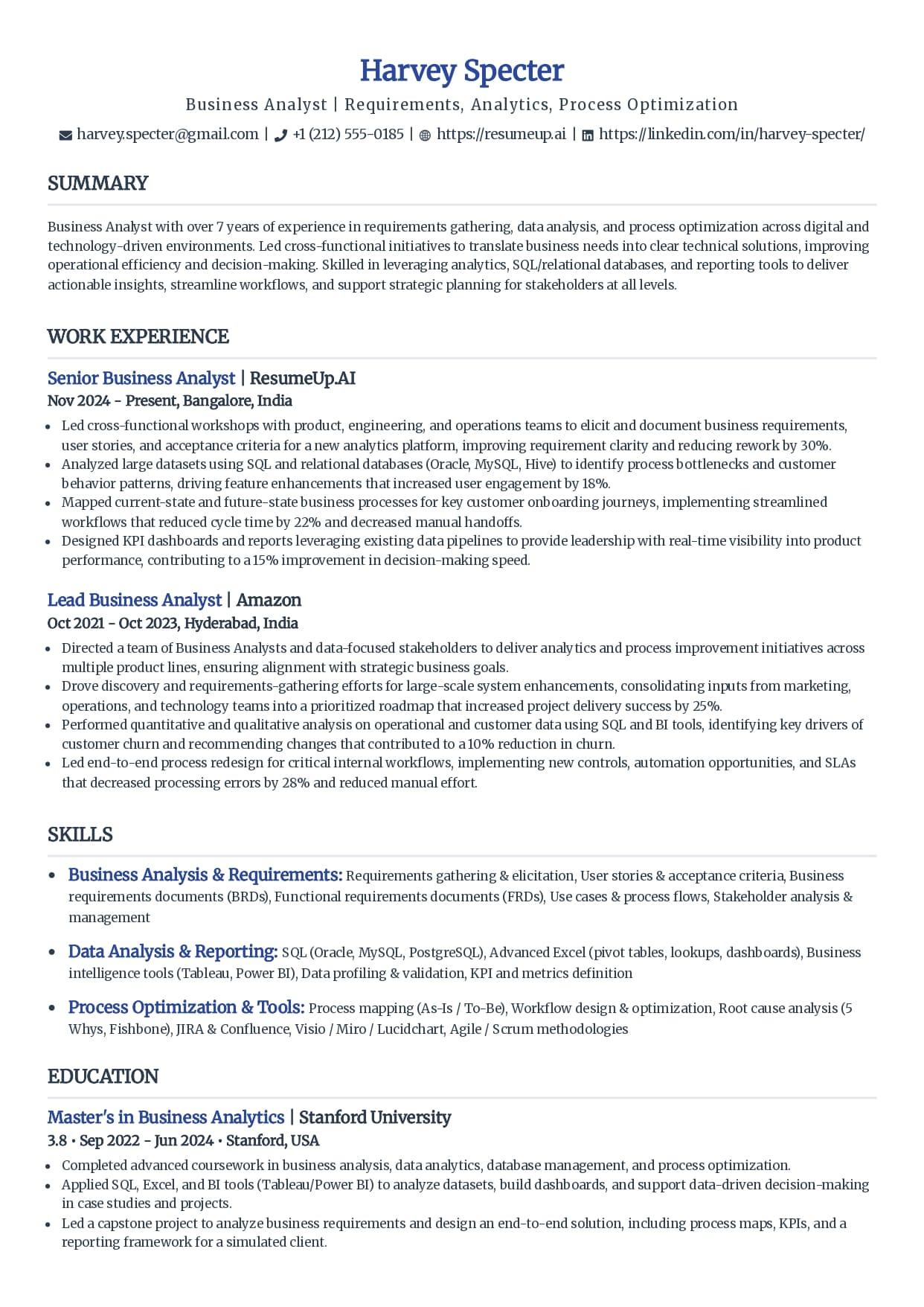
Simple
Styling stripped down to what helps a reader: a highlighted name, subtle color on role titles, and generous spacing between sections. All the attention goes to your content, which is exactly where the ATS looks too.
Best for
Students, recent graduates, and career changers whose content is still growing into the page
Tech and startup applications where a clean, modern page fits the culture
Dense resumes that need breathing room to stay skimmable
Why it parses: Color is applied to text only; every word stays real, selectable text the parser reads normally.
Use the Simple template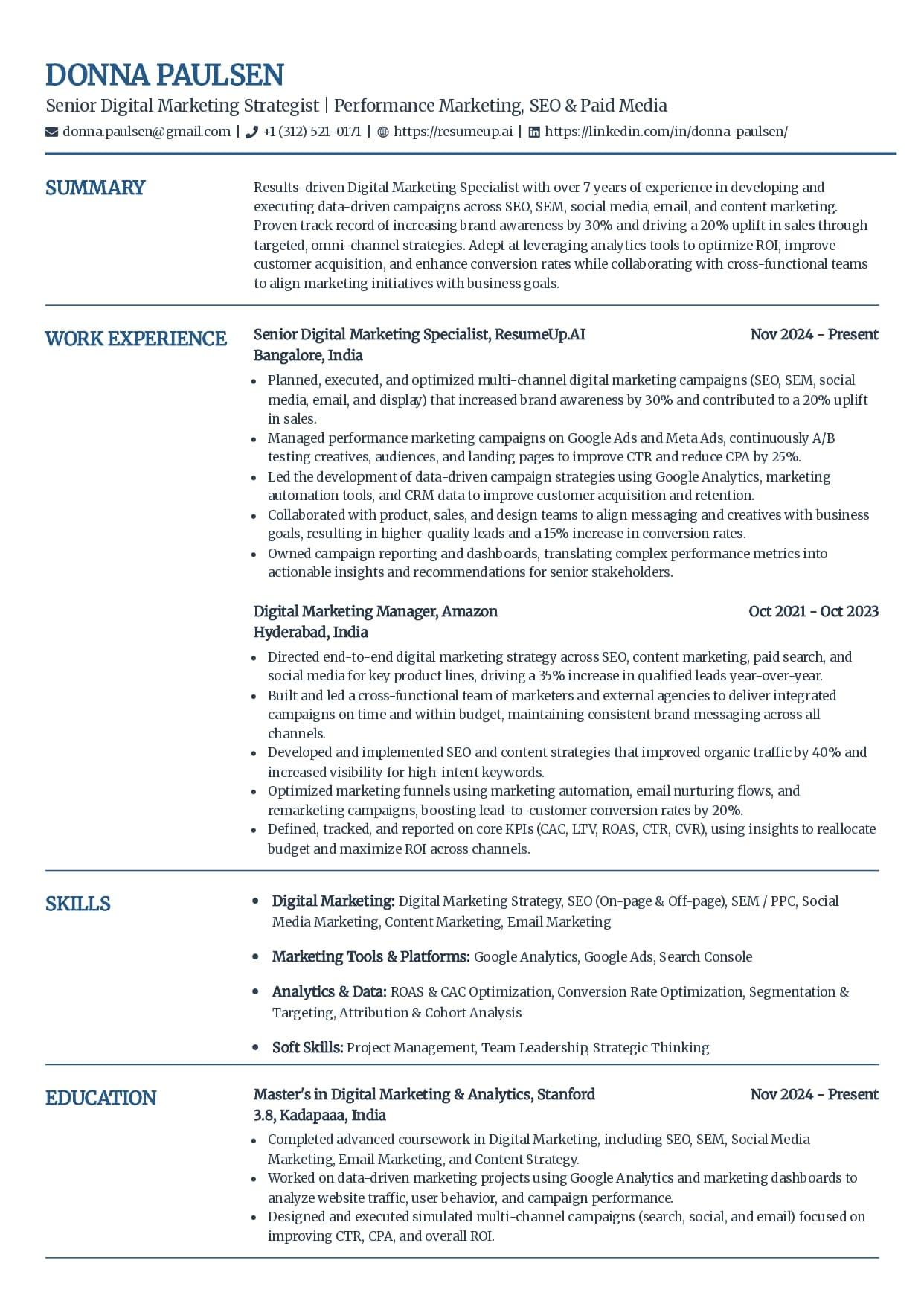
Craft
More visual structure than a plain stack: section labels sit in a slim margin beside your content, with navy accents on your name and headings. The distinctive look is built entirely from real text and spacing, not tables or text boxes, so the ATS still reads one clean flow of content.
Best for
Marketing, sales, and client-facing roles where a bit of polish helps the first impression
Applicants who want a more designed page without gambling on parsing
Resumes that will be read by humans and software in equal measure
Why it parses: The structure comes from spacing and real text, not tables or text boxes, so content is not scrambled at parse time.
Use the Craft templateLooking for a Specific Style?
Every template on this page parses the same way. If you already know the look you want, these guides go deeper on one style each, still single-column, still built from real text.
Modern
A current, polished look that still parses clean, for mid-career, marketing, and tech roles.
See the modern templatesSimple
A minimalist layout for students, first internships, and career changers with a shorter history.
See the simple templatesWord
Which built-in Microsoft Word templates break the parse, and how to build a safe one in Word.
See the word templatesGoogle Docs
Why Google Docs' own Template Gallery resumes hide a table that scrambles, and five safe picks instead.
See the google docs templatesFree
The free single-column picks, plus how to spot a fake ATS-friendly template sold elsewhere.
See the free templatesApplying With a CV Instead?
CV vs Resume: Does the Word Matter for ATS?
Not to the software. An applicant tracking system flattens either document to plain text and reads it top to bottom, so the word on the title changes nothing about the parse. Every template above works as a CV exactly as it is.
What changes is the convention behind each word, and that is where a US-only template can quietly mislead a UK, EU, or academic applicant. Here is the map.
| Where you are | The word used | What it means |
|---|---|---|
| US and Canada | Resume | A one to two page job document. The word CV is reserved for academic, research, and medical roles. |
| UK and Ireland | CV | The standard job document for almost every role, usually two pages, one for early-career applicants. |
| Continental EU | CV | Often two to three pages. Europass is a common standard, and some countries still expect a photo. |
| Australia and NZ | CV or resume | The two words are used interchangeably, and two to three pages is normal for either. |
| Academic, any country | CV | A long record of publications, teaching, and grants with no page cap. This is the original meaning of CV. |
UK and EU Rules a US Template Gets Wrong
Most templates that rank for "ats cv template" are US resume templates wearing the word CV. They are fine on layout and silent on the conventions that actually differ abroad.
Leave the photo off
A UK CV omits the photo, both as anti-bias practice and because an embedded image can be misparsed. Some continental-EU and Europass CVs still include one, but it adds parsing risk either way, so drop it if the employer does not require it.
Cut the personal-detail block
Date of birth, age, marital status, nationality, and your full home address do not belong on a UK CV. List your city, and confirm your right to work only if the posting asks.
Match the page length to the region
A UK CV runs two pages, one for early-career applicants and rarely more than two. Continental EU CVs run two to three, a US resume is one to two, and an academic CV has no cap. Length is a convention, not something the parser scores.
Rebuild a Europass CV before you send it
The default Europass template leans on tables and a two-column block, which is exactly what scrambles in a parse. Keep the content Europass asks for, but move it into a single column of plain text before you upload it to a portal.
A personal statement (UK) and a professional summary (US) are the same block with two labels: three to five plain-text sentences that lead with your role, level, and years.
An academic CV follows the same parsing rules at any length, publications and grants included, as long as it stays single-column with standard headings rather than a LaTeX two-column layout or tables.
What Makes a Resume Template ATS-Friendly
An Applicant Tracking System strips your resume to plain text, maps it into fields by its headings, and matches it against the job description. Anything the parser cannot read is information lost, however good it looks to a human.
| Element | ATS-safe | Risky |
|---|---|---|
| Layout | One column, sections stacked top to bottom | Two columns, sidebars, text boxes |
| Headings | Work Experience, Education, Skills, Summary | Creative labels like "My Journey" or "Toolbox" |
| Text | Real, selectable text in standard fonts at 11 to 13 points | Text inside images, headers, footers, or graphics |
| Skills | Plain lists grouped under labeled lines | Skill bars, star ratings, icons, infographics |
| Photo | No photo (standard for US, UK, and Canada applications) | Headshots, logos, decorative imagery |
| File | Text-based PDF or DOCX export | Scanned images, unusual formats, locked files |
Format matters too. Every template here is reverse-chronological, most recent role first with clear dates a parser can build a timeline from.
Functional and skills-based formats bury the work history the ATS is trying to extract. Hybrid formats parse well only while they stay in one column with standard headings.
Why the layout is worth the care
In Harvard Business School's Hidden Workers study with Accenture in 2021, more than 90 percent of surveyed employers using screening software leaned on it to make a first cut or rank applicants. The software rarely deletes your resume. A layout it reads badly just sinks you down a ranked list, where a busy recruiter never scrolls.
The ATS Compliance Checklist
"ATS-compliant" is measurable, not a label to trust on sight. Eight checks separate a template that complies from one that only looks the part, and they work on anything you downloaded elsewhere too.
One column, top to bottom
Sections stack vertically with no sidebar. A second visible column is the single most common reason a template fails a parse.
Standard section headings
Work Experience, Education, Skills, Summary. These are the labels the software maps to fields. A creative rename breaks the mapping.
Every word is real, selectable text
Drag to select the whole page. If a heading, your name, or a section will not highlight, it is a graphic the parser cannot read.
No photo or headshot
A photo is an image, and a parser reads nothing from one. Standard US, UK, and Canada resumes carry no photo at all.
No tables or text boxes for content
Content in a grid or a box reads back out of order, which is exactly what happened in the parse test above. Keep it flowing text.
Plain round or dash bullets
Custom glyphs, checkmarks, and arrows can turn into stray characters. Standard bullets always parse.
Contact details in the body
Name, email, phone, and city as plain text on their own lines at the top, never in the header or footer band. Put them in the document header and they extract as nothing at all, which is what happened when I tested it.
Exports to a text-based PDF or DOCX
The file you send keeps its text selectable. A scan or an image export has none, so the parser reads a blank page.
A template that clears all eight is compliant the moment you download it. It stays that way only if you keep it single-column, leave the headings alone, and export as text, not an image.
What an ATS-Friendly Resume Actually Looks Like
Not a template screenshot, the text itself. Four sections, each with what a parser reads cleanly beside what it reads as nothing.
Contact line
Parses cleanly
Jordan Lee
[email protected] | (512) 555-0148 | Austin, TX | linkedin.com/in/jordanlee
Plain text on its own lines near the top of the body. Every parser finds the email and phone in the fields it expects.
Reads as nothing, or scrambles
[Header band: photo, name in a text box, icons for phone and email]
Contact details placed inside a document header, or carried by icons instead of words, often never reach the parser at all.
Summary
Parses cleanly
Operations manager with 7 years leading distribution teams of 15+. Cut fulfillment errors 22% by rebuilding the QA checklist and led a warehouse management system rollout across 3 sites.
One paragraph of real text, keywords from the target role worked in naturally, a countable result up front.
Reads as nothing, or scrambles
[Skill-bar graphic] Leadership ████████░░ Operations ██████░░░░
A rating graphic carries no text a parser can read. "Leadership" and "Operations" as bars are two skills you did not actually list.
Work experience bullet
Parses cleanly
Managed a 12-person warehouse team and cut average order processing time by 18% over two quarters.
A standard bullet under a Work Experience heading, one countable detail, plain characters.
Reads as nothing, or scrambles
➤ Managed a team 👥 and improved processing time 📈
Custom glyphs and emoji in place of words can render as stray characters or drop out, and the number is missing entirely.
Skills
Parses cleanly
Skills
Inventory Management, Warehouse Management Systems (WMS), Team Leadership, Six Sigma, Supply Chain Coordination
A labeled Skills heading with a plain, comma-separated list the parser maps straight into the skills field.
Reads as nothing, or scrambles
[Two-column sidebar: icon grid of skill logos, no text]
Skills placed in a sidebar column get read out of order or merged into the job history next to them, and icon-only skills read as nothing.
These are the same rules laid out in the full ATS resume format guide. To see exactly what a parser pulls from your own file, section by section, run it through the free ATS resume parser.
A Template Is the Start. Test the Finished File.
A safe layout removes the parsing traps. It cannot check your headings, your keywords, or how the file exported. You can, in a minute, before you apply.
ATS Resume Checker
FreeUpload the finished resume for a 0-100 score and a 30+ check report in under 60 seconds. This is the test a template can't do for you.
Check my resumeATS Resume Parser
FreeSee the raw text a parser pulls from your file, section by section, so you catch anything the layout dropped before it costs you.
Preview the parseResume Keyword Scanner
FreePaste a job posting and see your keyword match rate. The template can't fix this half; the words you use for each role can.
Scan against a jobAI Resume Builder
PremiumOpen any template in the builder and it stays single-column as you edit, with writing help for wording and keywords on the paid plans.
See the builderNew to how any of this works? Start with what a good ATS score actually means or how Workday parses and ranks a resume.
- Resumes Analyzed
- 50K+
- Average ATS Score Increase
- 25%
- ATS Checks Per Full Report
- 30+
- From Upload to ATS Score
- <60s
Free ATS Resume Checker
Built a Resume From a Template? Prove It Parses.
A safe layout gets you most of the way. The free checker reads the finished file the way an ATS does and shows the 30+ checks behind your score, in under 60 seconds.
ATS Resume Template FAQs
- What is an ATS-friendly resume template?
- An ATS-friendly resume template is a single-column layout that uses standard section headings and real, selectable text, with no tables, columns, photos, or graphics that a parser can misread. That is the whole definition. Every template on this page fits it, which is why each one reads top to bottom in the order you wrote it.
- Are these resume templates free?
- Free ATS-friendly templates are included, and premium templates come with the builder plans. The AI resume builder itself is a premium feature, with no surprise fee at download. The ATS resume checker and the resume keyword scanner stay free with no signup either way.
- Is PDF or Word better for an ATS resume?
- Both work. Modern ATS platforms handle text-based PDF and DOCX files well, and the builder exports both. Whichever you pick, make sure it is real text rather than a scanned image, and if the job posting asks for a specific format, always follow the posting.
- Do ATS systems reject two-column resumes?
- Not automatically, but two-column layouts are the most common reason a resume parses badly. ATS software reads top to bottom, so content split across columns can be read out of order or mixed together, and a scrambled resume ranks low even when the candidate is qualified. A single-column layout removes that risk entirely, which is why every template on this page uses one.
- What fonts are ATS-safe?
- Standard fonts like Arial, Calibri, Helvetica, Georgia, and Times New Roman at 11 to 13 points. The font matters less than the text being real: any common professional font parses fine, while text trapped inside a graphic fails in every font. Every template here uses standard fonts by default.
- Are Google Docs and Canva templates ATS-friendly?
- Some are, many are not. The test is the same regardless of where a template comes from: one column, standard section headings, and every word as real text rather than graphics. Design-first template libraries mix safe layouts with photo headers, skill icons, and multi-column designs on the same page, so check any template you download by running the finished resume through a free ATS checker.
- Does a template guarantee my resume passes the ATS?
- No, and any template store that says so is overselling. A safe template removes the layout traps that break parsing, but your section headings, the keywords you use for each job, and how you export the file still decide whether the resume ranks. The template is the starting point. The proof is testing the finished file, which is why we hand you a free checker.
- How do I test whether a template is really ATS-compliant?
- Export the finished resume and read the text a parser pulls back out of it. Upload the file to our free parse preview and check three things against the page you designed: every section heading appears, your email and phone are found, and the blocks come back in the order you wrote them. When I ran a two-column file with its contact details in the Word header through that same extraction, all three contact fields came back missing and the sidebar blocks landed in the middle of the work history.
- Do I need a different template for every job?
- No. The template can stay the same; it is the keywords that must change per application. ATS ranking compares your resume against each specific job description, so tailor your skills section and recent bullets for every role, and use the free resume keyword scanner to see your match rate before you apply.
- How do I know if my resume passed the ATS?
- You usually cannot see inside an employer's ATS, which is why testing before you apply matters. Upload your resume to our free ATS resume checker to get an instant score, then a full report of 30+ checks across parsing, structure, keywords, and language. Fix what fails, re-check, and apply knowing how your resume reads to the software.
- Is a CV the same as a resume for an ATS?
- To the software, yes. An applicant tracking system flattens either one to plain text and reads it top to bottom, so it does not care which word is on the title. What changes is the convention behind each word: a US resume runs one to two pages, while a UK CV runs two, and an academic CV runs much longer. Build for the convention, and the parser handles the rest.
- Should a UK CV include a photo?
- No. A UK CV leaves the photo off, both as standard anti-bias practice and because an embedded image carries no text for a parser and can misread the surrounding layout. Some continental-EU and Europass CVs still include one, but if the employer does not require it, dropping the photo is safer for the parse.
- How long should an ATS CV be?
- Match the length to the region, not to the software, because the parser reads content rather than counting pages. A UK CV is two pages, one for early-career applicants. A continental-EU CV runs two to three, a US resume one to two, and an academic CV has no page cap.
- Can an academic CV be ATS-friendly?
- Yes, as long as it parses. An academic CV can run many pages of publications, teaching, and grants, and the software reads all of it because it maps content, not page count. The trap is the layout: a LaTeX two-column or table-heavy design breaks the parse, so keep it single column with standard headings.
Who wrote this
Rohith Reddy Jarugu, builder of ats resume checker. Ten years in software hiring, 500+ interviews conducted, now building career tools full time. LinkedIn