Free Keyword Match Tool
Free Resume Keyword Scanner: Match Your Resume to Any Job
Paste a job description, upload your resume, and see your match rate in seconds, with every missing keyword listed. Free, no signup, and your resume never leaves your browser.
99% of Fortune 500 companies screen resumes with an Applicant Tracking System, so the right keywords decide whether a recruiter ever sees yours.
1. Your resume
Drop your resume here or click to upload
PDF or DOCX, up to 10MB
2. The job description
100% private: your resume and the job description are compared in your browser and never uploaded to our servers.
Skill detection includes information from the O*NET 30.1 Database by the U.S. Department of Labor, Employment and Training Administration (USDOL/ETA), used under the CC BY 4.0 license.
- Resumes Analyzed
- 50K+
- Skills in the Match Database
- 8,000+
- Scanned in Your Browser
- 100%
- Resumes Stored or Uploaded
- 0
How It Works
How the Resume Keyword Scanner Works
From job posting to a tailored, keyword-matched resume in four steps.
- 1
Paste the job description
Copy the full job posting, including the requirements and qualifications sections where the keywords live.
- 2
Upload your resume
Drop in your resume as a PDF or DOCX. It's parsed in your browser and never uploaded.
- 3
Get your match rate
Your resume is checked against 8,000+ skills and technologies from the U.S. Department of Labor's O*NET database, plus the job post's own recurring terms.
- 4
Add keywords and re-scan
Add the missing keywords that are true of your experience, then re-scan until you hit 75% or higher.
Sample Report
See a Sample Keyword Match Report
This is the exact report you get. We scanned a sample marketing resume against a Digital Marketing Manager job description: every keyword is grouped and counted, and the missing ones are listed first so you know exactly what to add.
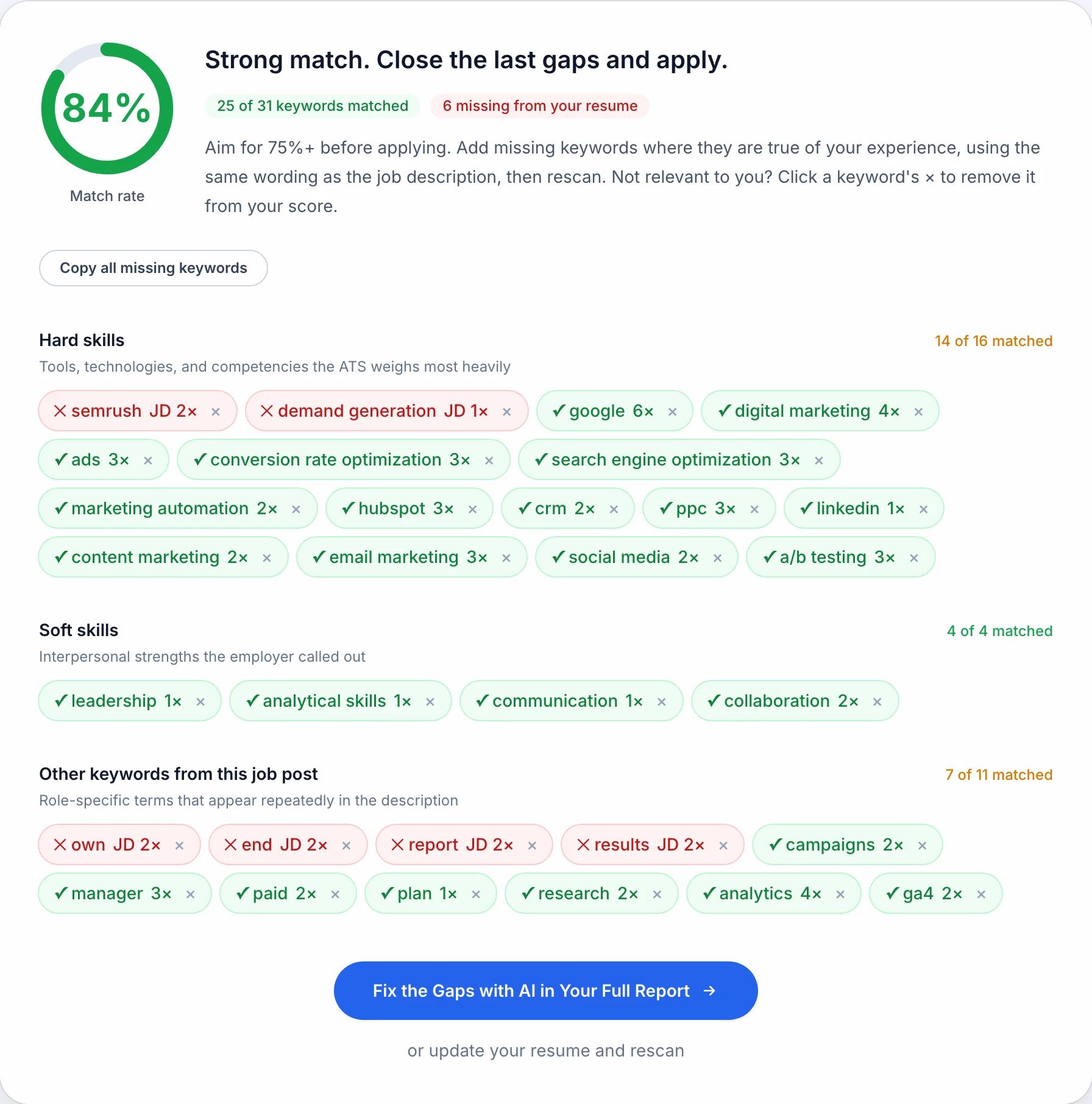
Match Rate
What Is a Good Resume Match Score?
Our scanner counts a hard skill three times a soft skill or a general term, because the hard requirements are what a posting screens on. Here is how to read your result.
75% and above: Apply
A strong match on words, and a floor rather than a finish: our own test resume crossed it by typing in three skills it already had. Close any remaining gaps that are true of your experience, then submit.
50% to 74%: Tailor first
You'll pass the scan, but recruiters searching by skills will see stronger matches first. Add the missing hard skills to your skills section and recent experience bullets, then re-scan.
Below 50%: Rework it
Your resume isn't speaking this job's language. Rewrite your summary and experience around the requirements in the job description, or reconsider whether the role fits your background.
Measured, 23 September 2026
What Four Rounds of Tailoring Actually Scored
The 75% line above is our number, so I went and checked what it costs to reach it. One operations resume, one job post, and one change at a time.
Every version ran through the same two pieces of code this page runs when you use it: the extraction behind our parser and then the matcher behind the scanner at the top of this page.
- +15
- points from typing three skills the candidate already had onto the skills line
- +0
- change from proving those same three skills in bullets with numbers attached
- 94%
- where this resume topped out, once three words that are not skills were dismissed
| What changed | Hard skills | Match rate |
|---|---|---|
| Nothing. The resume as it was sent | 10 of 13 | 67% |
| Three true skills added to the skills line | 13 of 13 | 82% |
| The same three skills proved in experience bullets | 13 of 13 | 82% |
| The posting's four soft-skill words written in | 13 of 13 | 89% |
| Three non-skill words dismissed with the ignore button | 13 of 13 | 94% |
Seventy-five percent took four words
The resume had run a Six Sigma review, rolled out SAP and built the weekly forecast. It had never written any of those three down, and typing them onto the skills line took it from 67% to 82%.
That is the honest shape of a match score, ours and everyone else's. It asks whether the words are on the page, so any threshold on it is cheap to cross.
Proving a skill scored exactly what listing it scored
The third revision rewrote the bullets so those same three terms carried real work: the SAP rollout across three sites, the Six Sigma root cause review behind a 22% drop in errors. The rate did not move by a point.
Our scanner counts a term once, wherever it sits. Put the keyword in a bullet with a number on it anyway, for the recruiter who reads you after the software has ranked you.
The soft skills were the largest gap left
The posting asked for leadership, communication, collaboration and cross-functional work. The resume demonstrated all four and named none of them, so all four came back missing until the posting's own words went in.
Those four words were worth 7 points. A perfect 13 of 13 on hard skills still left the resume under 90%, because soft skills and the posting's recurring terms are a third of the weight.
Dismissing the noise was worth another 5
Our extractor pulled own, center and run out of the posting because it repeats them. None of the three is a skill, and clearing them with the x on each keyword took the rate to 94%.
Three others were worth keeping. Report, demand and stakeholders are the posting's own vocabulary, and this resume never uses them.
What this run does not tell you
Nothing here went through Taleo, Greenhouse, Workday, iCIMS or Lever. This was our own scanner, and none of those five publish how theirs ranks.
One resume, one posting, one industry. A different posting moves every number here, though the shape of the gaps should hold.
All four files were .docx. Nothing in this run speaks to PDF.
Our matcher compares whole words against a skills dictionary and a short list of equivalent forms, so it links fewer synonyms than a system with a full skills taxonomy would.
A match rate is word overlap and nothing more. It cannot tell whether you can do the job, and no other tool's number can either.
Reproduce the 67 and the 89
Here are the first and fourth files, plus the job post I scored them against. They are test fixtures with invented contact details, not resume templates.
Paste the job post into the scanner at the top of this page, upload each file in turn, and the same two numbers should come back. Then do it with the posting you are actually applying to.
Inside the ATS
How ATS Platforms Actually Use Your Keywords
Workday, Greenhouse, Lever, Taleo, and iCIMS differ in features, but they all put your keywords to work in the same ways. None of them silently deletes a resume over a missing word.
- 01
Ranking against the job description. The ATS compares your parsed resume to the posting's requirements and ranks every applicant. Recruiters review from the top of that list, and many never scroll past the first page.
- 02
Recruiter keyword search. Recruiters type exact terms like "financial modeling" or "Kubernetes" into their candidate database. If the term is not in your resume, you do not appear in the results at all.
- 03
Filters, not verdicts. Hard filters like location or a required license can exclude you, but keywords work through ranking and search. A low match rate means invisible rather than rejected, and the effect on your job search is the same.
How to Add Missing Keywords Without Keyword Stuffing
Mirror the Exact Wording
Use the job description's own terms. If it says "project management", write "project management", not "managed projects". ATS keyword search is often literal.
Spell Out Acronyms Once
Include both forms at least once, like "Search Engine Optimization (SEO)". Some ATS software and some recruiters search one form but not the other.
Put Keywords Where They Count
Work missing keywords into your skills section and your most recent experience bullets, attached to real accomplishments. Our scanner scored a listed keyword and a proved one the same, and the recruiter reading you next will not.
Only Add What's True
Never add a skill you don't have. Recruiters verify keywords in interviews, and a claim you can't back up costs you the job at the final stage instead of the first.
Keyword Examples
Example Resume Keywords by Role
Not sure which keywords a posting will ask for? Each card lists a role's hard skills first, because those are what carry a match rate, then the soft skills employers name alongside them.
Software Engineer
Engineering posts name exact languages and tools. Match the stack in the posting, not your full toolbox.
Hard skills
Soft skills
Digital Marketing Manager
Marketing posts mix channels and platforms. Include the exact platform names the employer runs on.
Hard skills
Soft skills
Registered Nurse
Healthcare posts lean on certifications and systems. Spell out each credential exactly as the posting does.
Hard skills
Soft skills
Financial Analyst
Finance posts reward specific methods and tools. Name the modeling and reporting work you have done.
Hard skills
Soft skills
Project Manager
PM posts name methodologies and certifications. Match the framework wording exactly, like "Agile" or "Scrum".
Hard skills
Soft skills
Data Analyst
Analyst posts name the exact stack. Mirror the tools and the kind of analysis the posting asks for.
Hard skills
Soft skills
Customer Service Representative
Support posts lean on systems and metrics. Name the platforms you used and the volume you handled.
Hard skills
Soft skills
Sales Representative
Sales posts reward pipeline and quota language. Quantify your results in the exact terms the posting uses.
Hard skills
Soft skills
Teacher
Teaching posts name credentials, grade levels, and methods. Spell out licenses exactly as the posting does.
Hard skills
Soft skills
Accountant
Accounting posts name standards and systems. Match the exact software and reporting terms in the posting.
Hard skills
Soft skills
These lists are a starting point, not a target. Every job posting weights keywords differently, so scan your resume against the actual job description before you apply.
Keywords Are Half the Battle. Formatting Is the Other Half.
A perfectly matched resume still fails if the ATS can't parse it. Run our free ATS resume checker to test your formatting, sections, and readability, and get your ATS score in seconds.
Testimonials
What Job Seekers Say About Our ATS Tools
Job seekers use the keyword scanner and the ATS checker to find what is holding their resume back and fix it before they apply. Here is what they told us.
"My score went from 58 to 86 in two rounds of fixes. It caught the technical keywords my resume was missing, and I finally started getting past the screening stage."
"Three months of applying with barely a callback. I fixed my resume with the checker's suggestions and got four interview calls within the next two weeks."
"This tool worked for me, my friends, and their friends too. We are all from different sectors. This tool works for every industry. "
"Thank you, atsresumechecker.ai's team. I never thought making resumes optimized for ATS could be so simple. "
Resume Keyword Scanner FAQs
Everything about matching your resume keywords to a job description. Have another question? Contact us and we'll help.
How does a resume keyword scanner work?
The scanner extracts the skills, job titles, and recurring terms from the job description you paste, then checks your resume for each one. Keywords are grouped into hard skills, soft skills, and role-specific terms.
Your match rate reflects how many it found, and a hard skill counts three times a soft skill or a general term. Everything runs in your browser, so your resume is never uploaded.
What is a good resume-to-job-description match score?
Aim for 75% or higher before applying. Between 50% and 74%, add the missing hard skills that are true of your experience and re-scan. Below 50%, your resume needs significant tailoring for the role.
Crossing 75% can be cheap: in our own test, a resume went from 67% to 82% by adding three skills it already had to its skills line.
A 100% match is not the goal and can read as keyword stuffing, so treat the number as a check on your wording rather than a verdict on your resume.
How do I tailor my resume to a job description?
Scan your resume against the job description, then add the missing keywords that honestly describe your experience. Put them in your skills section and your most recent experience bullets, mirror the job description's exact wording, and quantify the achievements around them.
Re-scan until your match rate is 75% or higher, and repeat for every job you apply to, since each posting expects different keywords.
Is this resume keyword scanner free? Do I need to sign up?
Yes, it's completely free and there is no signup. Upload your resume, paste the job description, and get your match rate and missing keywords instantly.
Your full report, which adds AI fixes, a deeper 30+ check analysis, and an overall ATS score from our free ATS resume checker, is where our paid plans come in.
Can the scanner tell hard skills from soft skills?
Yes. Hard skills are the tools, technologies, certifications, and competencies named in the job description, and they carry the most weight in your match rate.
Soft skills like communication and leadership are listed separately, and role-specific terms that repeat through the posting are grouped on their own, so you can see exactly which kind of gap you have.
Do ATS systems automatically reject resumes missing keywords?
Usually not automatically. Most ATS software ranks resumes rather than rejecting them outright.
But recruiters filter and search by keywords and review the top-ranked resumes first, so a low keyword match means your resume is rarely seen by a human, which has the same effect as a rejection.
Should I use the exact wording from the job description, or do synonyms count?
Use the exact wording. Some ATS software matches synonyms and related terms, but many match literally, and recruiters search for the terms in their own job post.
For acronyms, include both forms at least once, like "Search Engine Optimization (SEO)", so you match either search.
Do Workday, Greenhouse, and other ATS platforms handle keywords differently?
The mechanics are the same across the major platforms, including Workday, Greenhouse, Lever, Taleo, and iCIMS: the ATS parses your resume into structured fields, matches it against the job description, and ranks you in the recruiter's queue.
Recruiters in every one of them also search and filter candidates by exact terms. That is why mirroring the posting's wording matters more than which ATS the employer runs; a resume that matches the job description ranks and surfaces well in all of them.