Free ATS Templates
Free ATS Templates, and How to Spot the Fakes
Half the templates sold as ATS-friendly are the exact thing that breaks a parse. Here are free single-column templates that read cleanly, and a quick way to audit any other one you find.
Key Takeaways
A free ATS resume template is a single-column layout with standard headings and real text. Every template on this page is exactly that, and free to use and export.
Half the "free ATS-friendly" templates online are not. A sidebar, a photo, or skill bars breaks parsing, no matter what the download page calls the file.
A template removes the layout traps. It does not guarantee a pass. Your headings, keywords, and file export still decide whether the resume ranks.
The only way to know a template parses is to test the finished file. Run it through the free checker and fix what the report flags before you apply.
- Resumes Analyzed
- 50K+
- Average ATS Score Increase
- 25%
- ATS Checks Per Full Report
- 30+
- From Upload to ATS Score
- <60s
Are Free ATS Resume Templates Any Good?
The good ones are excellent, and free is fine. An ATS-safe template is a single-column layout with standard headings and real text, and nothing about that costs money to get right. The catch is that "free ATS-friendly" is a label, not a promise, and plenty of pretty templates wearing it are the exact thing that breaks a parse.
So this page does two things. It gives you templates that are genuinely safe, each one single-column and built from real text. And it teaches you to audit any other template you find, because the next great-looking design you download from somewhere else deserves the same two-minute check. Start with the gallery, then learn the tells.
ATS-Safe Templates
Free Templates That Read Cleanly
Each of these is single-column, standard-headed, and built from real text, so it parses in Workday, Greenhouse, Lever, Taleo, and iCIMS without scrambling a line. Pick by look, because they all parse the same.
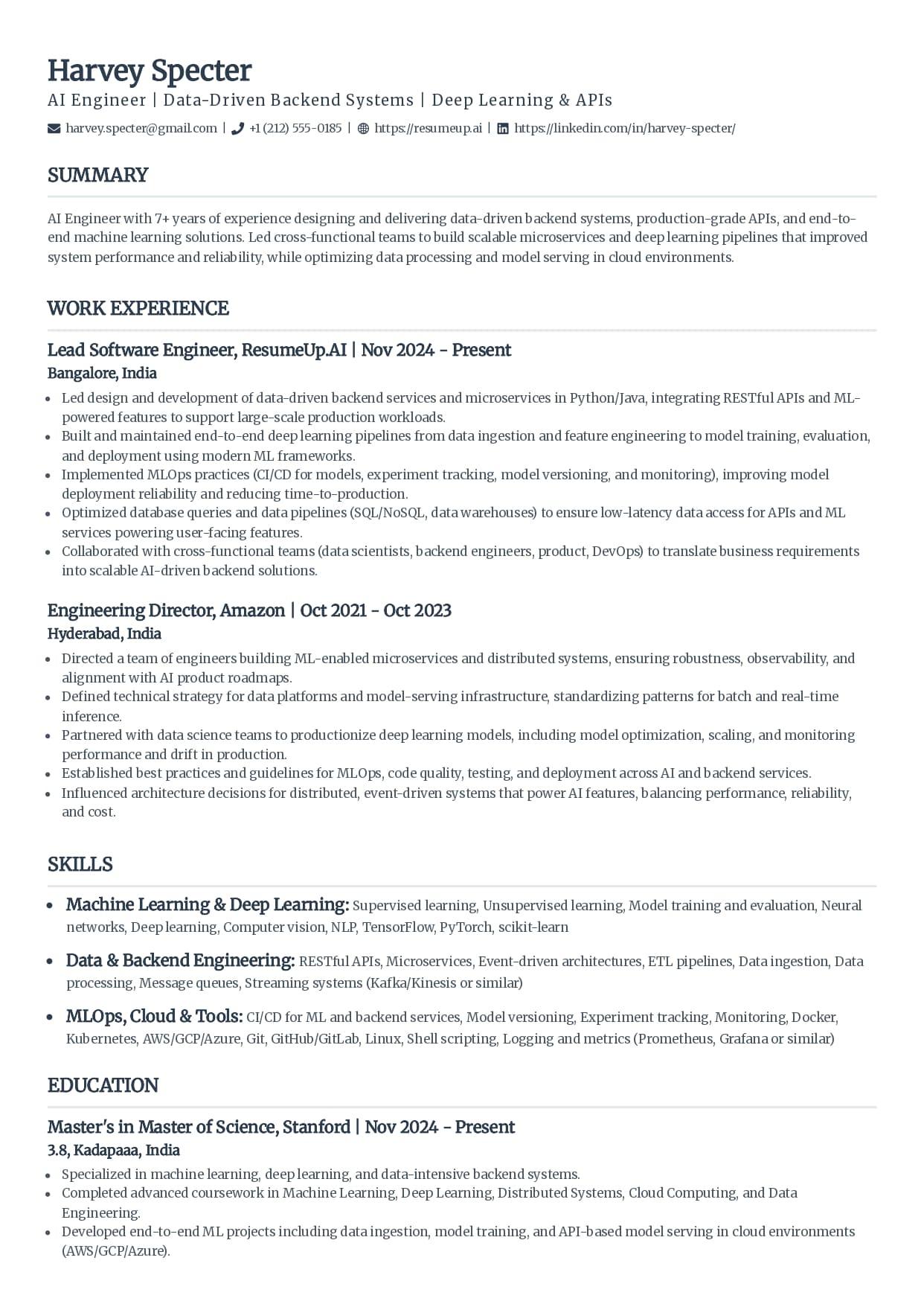
Classic
The single-column standard recruiters see every day.
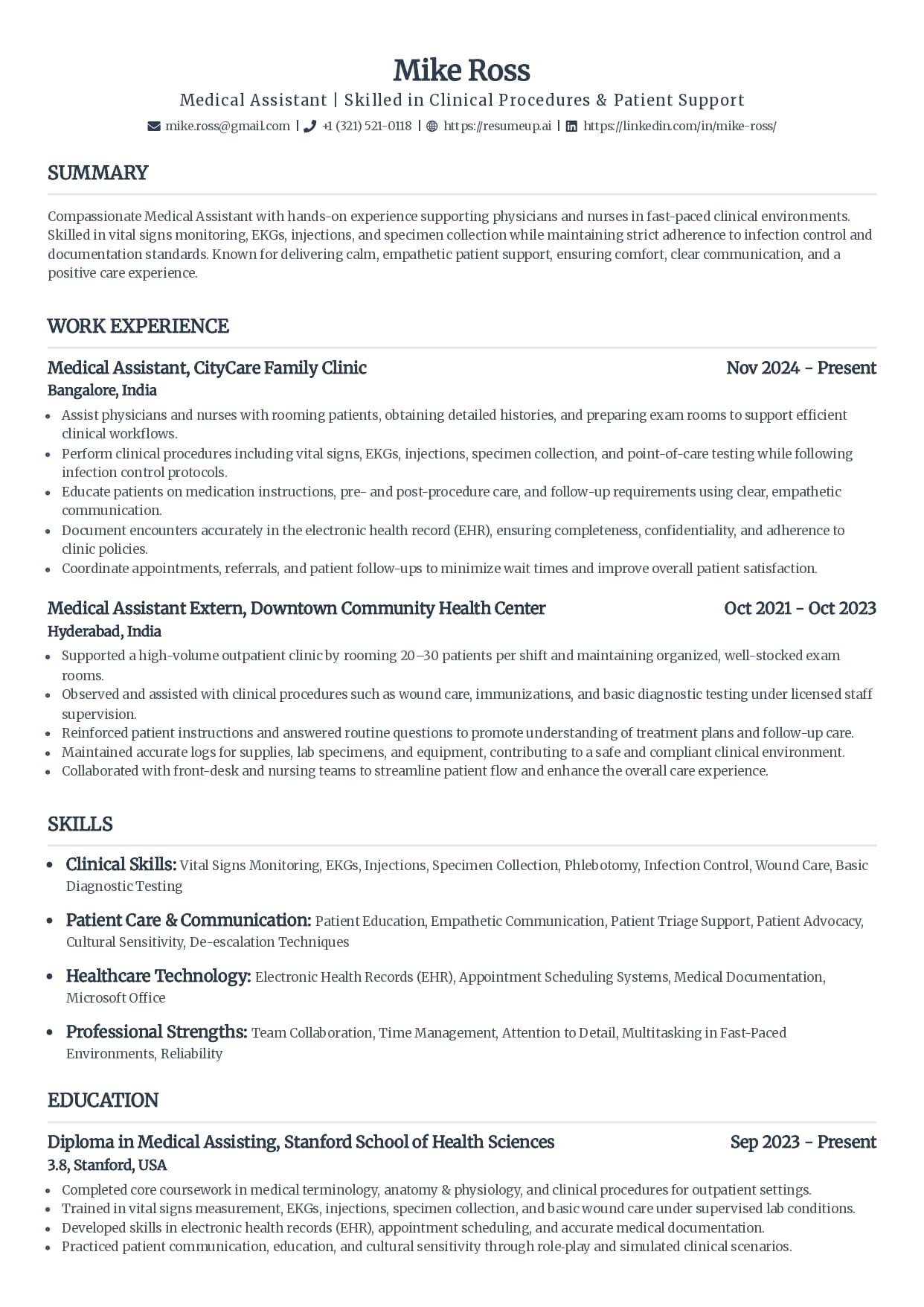
Standard
Clean serif headings with clear section rules.
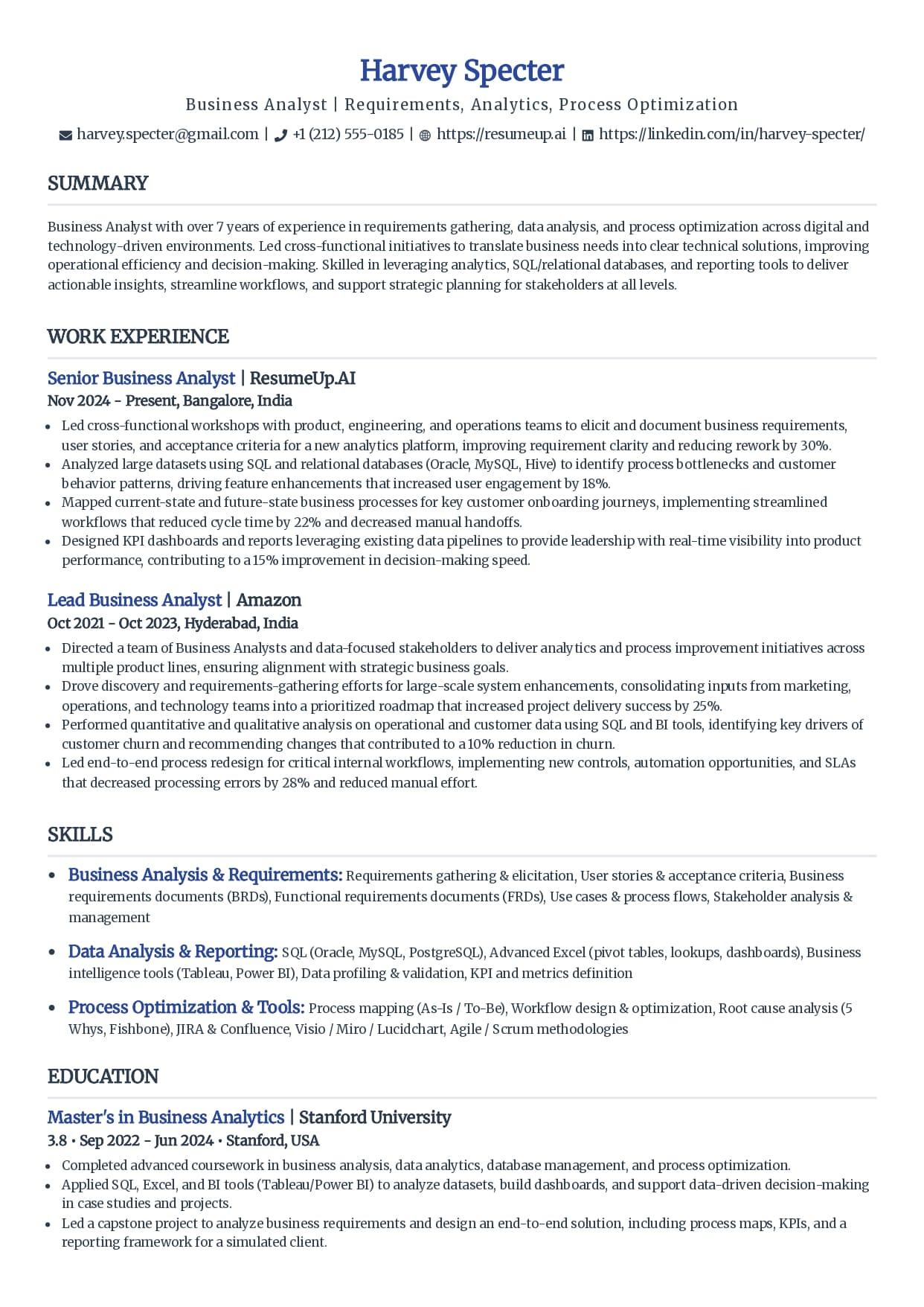
Simple
Minimal styling that keeps every line readable.
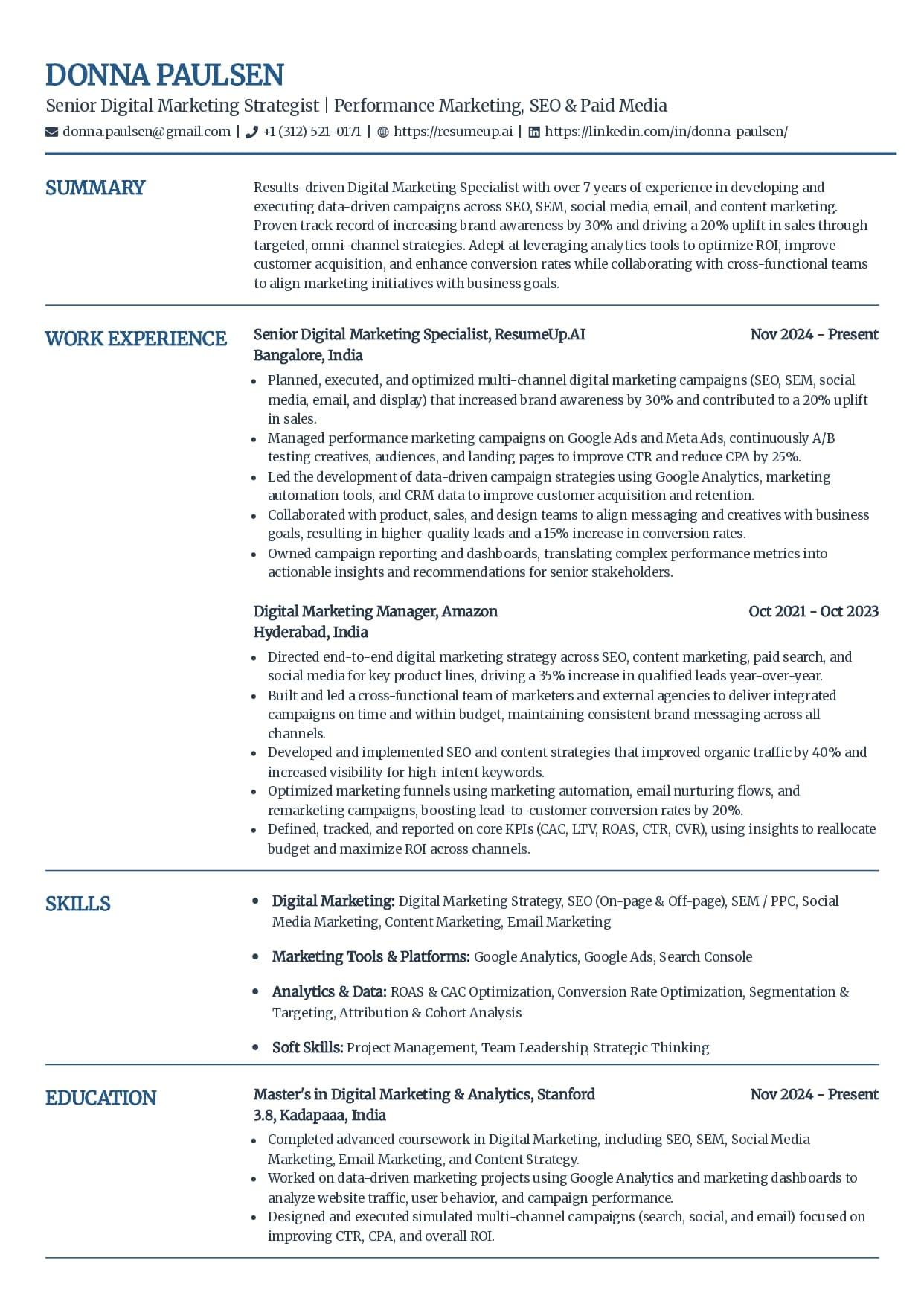
Craft
A subtle touch of color without breaking parsing.
See why these templates parse cleanly
Free ATS-friendly templates are included, and each one exports as a text-based PDF or DOCX with no fee at download. The AI writing help and premium templates come with the builder plans, but using and exporting these layouts costs nothing.
What Makes a Resume Template ATS-Friendly
Every template store uses the phrase, so here is what it concretely means. A parser strips your resume to text and sorts it into fields by heading. Anything it cannot read is information lost, however good it looks to a person. Each row below is one decision, safe on one side and risky on the other.
| Element | ATS-safe | Risky |
|---|---|---|
| Layout | One column, sections stacked top to bottom | Two columns, sidebars, or text boxes |
| Headings | Work Experience, Education, Skills, Summary | Creative labels like My Journey or Toolbox |
| Text | Real, selectable text in a web-safe font | Text baked into an image, icon, or logo |
| Skills | Plain lists grouped under labeled lines | Skill bars, rating stars, or infographics |
| Photo | No photo (standard for US, UK, Canada roles) | A headshot or decorative header image |
| Contact | In the body, as plain text on their own lines | Inside the document header or footer |
| File | Text-based PDF or DOCX export | A scan, an image, or a locked file |
For the layout and file side of this in more depth, the guide to the ATS resume format shows a two-column layout parsing into gibberish next to a clean single-column one.
How to Spot a Fake ATS-Friendly Template
Anyone can slap "ATS-friendly" on a download page. The design-first libraries do it constantly, mixing safe layouts and broken ones under the same label. Here is how to tell in two minutes, before you build a resume on the wrong foundation.
A sidebar down one side
The most common tell. A colored column holding skills, contact details, or a summary looks organized and parses like a car crash. The software reads across both columns and splices them together. If the layout has two visible columns, it is not ATS-safe, whatever the download page calls it.
A photo or headshot
A photo is an image, and a parser reads nothing from an image. Worse, a headshot at the top often pushes your name and contact details into a graphic region the software skips. Standard US, UK, and Canada resumes carry no photo at all.
Skill bars and rating dots
Those five-dot proficiency meters and progress bars are pictures. The parser drops them, so a skill shown only as a bar is a skill you did not list. A recruiter distrusts them too, because a dot is not evidence. Skills belong in plain text.
Contact details in the header
Open the template and click near the name and phone number at the very top. If they sit in the document header or footer band, many parsers never read them, and a resume with no findable email is a dead end no matter how strong the rest is.
Icons standing in for words
A little envelope instead of the word email, a pin instead of your city, a phone glyph instead of a label. Cute, and invisible to the parser. If meaning is carried by an icon rather than text, the software loses it.
It fails the highlight test
The fastest audit there is. Open the file and drag to select everything. Any block that will not highlight is a graphic the parser cannot read. If your name, a heading, or a whole section refuses to select, that template is working against you.
What's Free, and What Isn't
Honesty here, because template pages love to blur it. The templates on this page are free to use and export, with no surprise fee at download. Open one and it applies in the builder, staying single-column while you fill it in, and you can export a clean PDF or DOCX for nothing.
The paid part is the AI resume builder itself: the writing help for wording and keywords, the extra premium templates, unlimited resumes and cover letters. That is a real product with a real price, and I will not call it free to win a click. The checker, the parser, and the keyword scanner are genuinely free with no signup, and the free templates are yours to use whether or not you ever pay for the builder.
Free, no signup
- The single-column templates on this page
- Exporting them as a text-based PDF or DOCX
- The ATS resume checker and score
- The resume parser and the keyword scanner
Part of the paid builder
- AI writing help for wording and keywords
- The full set of premium templates
- Unlimited resumes and cover letters
- The job tracker and Chrome extension
Want the full picture on the paid side? The resume builder page lays out what the plans include, and the templates hub shows each layout in more detail.
How to Use a Free Template Without Breaking It
A safe template only stays safe if you keep it that way. The most common way people undo a good template is by trying to make it fancier. Four rules keep the parse clean.
Keep it in one column
The template starts single-column for a reason. Do not add a sidebar for skills or a second column to save space. If you run long, cut words, do not split the page.
Do not rename the headings
Leave Work Experience, Education, and Skills as they are. A clever rename feels personal and costs you the field mapping that makes the section count.
Type every detail as text
Add your contact details, skills, and dates as plain text. Resist the urge to drop in an icon, a logo, or a rating graphic. Real text is the whole point.
Export and test before you apply
Export a text-based PDF or DOCX, then run it through the free checker. A safe template gets you most of the way; the finished file is what you actually send, so prove that one.
Why Trust This
Written From the Hiring Side
I have opened resumes inside an applicant tracking system and seen a beautiful two-column template read back as a scramble of half-lines, the candidate's real experience lost in the splice. The template was sold as ATS-friendly. It was not. I build the tools that show job seekers what that software sees, so the honest test on this page is the same one I would run on any template before I trusted it with an application.
Who wrote this
Rohith Reddy Jarugu, builder of ats resume checker. Ten years in software hiring, 500+ interviews conducted, now building career tools full time. LinkedIn
A Template Is the Start. Test the Finished File.
A safe layout removes the parsing traps. It cannot check your headings, your keywords, or how the file exported. You can, in a minute, before you apply. No signup.
ATS Resume Checker
Upload the finished resume for a 0-100 score and a 30+ check report in under 60 seconds. This is the test a template can't do for you.
Check my resumeATS Resume Parser
See the raw text a parser pulls from your file, section by section, so you catch anything the layout dropped before it costs you.
Preview the parseResume Keyword Scanner
Paste a job posting and see your keyword match rate. The template can't fix this half; the words you use for each role can.
Scan against a jobATS Resume Templates Hub
The same single-column templates with a per-template breakdown of who each one fits and exactly why it parses cleanly.
See the full hubFree ATS Resume Checker
Picked a Template? Prove It Parses.
A safe layout gets you most of the way. The free checker reads the finished file the way an ATS does and shows the 30+ checks behind your score, in under 60 seconds.
Free ATS Resume Templates: FAQs
The questions people ask before trusting a free template with a real application. Still stuck? Contact us and we'll help.
Are these ATS resume templates really free?
Yes. Every template on this page is free to use and export, with no fee at download. Opening one applies it in the resume builder, where the AI writing help and the premium templates are part of the paid plans, but using these ATS-safe layouts and exporting a clean PDF or DOCX costs nothing. The ATS checker, parser, and keyword scanner stay free with no signup too.
What makes a resume template ATS-friendly?
A single-column layout, standard section headings, and every word as real selectable text, with no tables, columns, photos, or graphics a parser can misread. That is the whole definition. Every template here fits it, which is why each one reads top to bottom in the order you wrote it instead of scrambling in the parse.
How do I know if a free template is actually ATS-friendly?
Audit it before you trust the label. Check for a sidebar or second column, a photo, skill bars, icons standing in for words, and contact details in the header, since any of those breaks parsing. Then run the highlight test: open the file, drag to select everything, and see if anything refuses to highlight. For proof, export the finished resume and run it through a free ATS checker.
Can I download these templates in Word?
Yes. Each template opens in the builder and exports as a text-based PDF or DOCX, so you get a Word file that parses cleanly. DOCX is the safest default for older ATS software, and if a job posting names a format, send that one. Either export keeps your text real and selectable, which is what the parser needs.
Are Google Docs and Canva resume templates ATS-friendly?
Some are, many are not. The source does not decide it; the layout does. Design-first libraries mix safe single-column layouts with photo headers, skill icons, and two-column designs on the same page under one ATS-friendly label. Whatever you download, hold it against the same checklist, one column and real text, and test the finished file before you apply.
Does a free ATS template guarantee my resume passes?
No, and any template store that promises it is overselling. A safe template removes the layout traps that break parsing, but your headings, the keywords you use for each job, and how you export the file still decide whether the resume ranks. The template is the starting point. Testing the finished file is the proof, which is why we hand you a free checker.
Do I need a different template for every job?
No. Keep the same single-column template and change the keywords instead. An ATS ranks your resume against each specific posting, so tailor your skills section and recent bullets to the role every time, and check your match rate with the free keyword scanner before you send it.
Keep Reading
ATS Resume Format
The single-column, reverse-chronological layout an ATS parses cleanly, shown next to one it scrambles, with an element-by-element checklist and a free way to test your file.
Read the guideWhat Is an ATS-Friendly Resume?
The five criteria that make a resume ATS-friendly, why a clean format does not guarantee a pass, and two quick tests to check your own file before you apply.
Read the guide