ATS How-To
Build a Resume the ATS Can Actually Read
Most ATS advice is a pile of tips with no order to it. Here is the build in seven steps, ranked by how much each one moves your resume, and a free way to prove the finished file before you apply.
Key Takeaways
An ATS-friendly resume is a single-column, reverse-chronological layout with standard headings, real text, and a text-based PDF or DOCX file. Format comes before keywords, always.
Fix the layout first. A section the parser cannot read scores nothing, so no keyword or clever wording can rescue it. One column is the change that prevents the most damage.
Getting it wrong does not auto-reject you. It gets your resume misread, so your record ranks low and never surfaces in the recruiter's search. That is the real cost, and it is quieter than a rejection.
A resume can look right and still parse badly. Run the finished file through a free parser and read the exact text an ATS pulls from it before you apply.
- Resumes Analyzed
- 50K+
- Average ATS Score Increase
- 25%
- ATS Checks Per Full Report
- 30+
- From Upload to ATS Score
- <60s
How Do You Make a Resume ATS-Friendly?
Build it in one column, under standard headings, with your jobs in reverse-chronological order, real text throughout, keywords that match the posting, and a text-based PDF or DOCX export. Then test the file before you apply. That is the whole method, and the order matters as much as the list.
Here is why order matters. When you apply, the software does not read your resume like a person. It strips the file to text and sorts that text into fields: name, job titles, companies, dates, skills. A layout it can follow fills those fields correctly. A layout it can't turns your resume into a jumble the recruiter never searches up. So formatting comes before wording, because the best keyword in the world scores nothing in a section the parser could not read.
The rest of this page is those steps, ranked. Start at the top. If you only fix the first two, you have already cleared the traps that sink most resumes.
The Seven Steps, in Order of Impact
Every guide gives you a pile of tips. Almost none tell you which ones matter most. These are ranked, so a fix near the top buys you more than three fixes near the bottom.
Put everything in one column
This is the single change that prevents the most damage, so it goes first. A parser reads a page top to bottom as one stream of text. A two-column layout gets read straight across, so a job title on the left ends up glued to a skill from the sidebar. Stack your sections instead: one column, full width, top to bottom.
Watch out:Two columns, sidebars, and contact details tucked in the document header.
Use section headings the parser knows
The software maps your resume into fields by reading your headings. Work Experience, Education, Skills, and Summary are the names it recognizes. A clever label like What I Bring reads fine to a person and lands nowhere for the parser, so the whole section under it may go uncounted.
Watch out:Creative headings like My Journey, Toolbox, or Career Highlights.
List your jobs in reverse-chronological order
Newest role first, each one dated, in order. That structure hands the parser a clean timeline it can build without reading a gap that is not there. A functional resume that groups skills with no dated roles behind them reads as an empty work history and gets you nothing.
Watch out:A skills-only functional layout, or dates in mixed or missing formats.
Mirror the words in the job posting
Ranking is keyword matching. Read the posting, find the skills, tools, and titles it names, and use the same words where your experience genuinely backs them up. Match the phrasing you can defend in an interview, not a list of tools you have never touched.
Watch out:Padding a skills list to game the match, or hiding keywords in white text.
Keep every word as real text
A parser reads text, not pictures. Skill bars, rating stars, icons, logos, and a name baked into a graphic all read as nothing. If a detail matters, type it as plain, selectable text. That includes your phone and email, which belong in the body, not in an image or a header.
Watch out:Skill bars, star ratings, text inside images, and photo headers.
Export a text-based PDF or DOCX
Modern systems read both formats well, as long as the file is real text and not a scan. DOCX is the safest default for older software, a text-based PDF is fine almost everywhere else, and if the posting names a format, send that one. The failure that costs people is exporting the resume as an image, which parses to nothing.
Watch out:A scanned file, a screenshot, or a design export that flattens text to an image.
Test the finished file before you apply
A resume can look right and still parse badly, so never trust it on looks alone. Read it back the way the software will. Run the file through a free parser and checker, look at the text it pulls and the score it gives, and fix anything that reads back empty or scrambled.
Watch out:Applying on the strength of how the resume looks in your PDF viewer.
Does a Bad Build Get You Auto-Rejected?
Almost never, and this is the part most advice gets wrong on purpose. An applicant tracking system ranks and filters resumes; it does not throw yours away because you used the wrong heading. You may have read that most resumes are rejected by software before a human sees them. That number traces to a sales pitch from a company that no longer exists, and it was never backed by real data. We will not repeat it, because it is not true.
The fear
A bot reads your resume, fails it on a formatting slip, and deletes you before any person is involved. One wrong font and you are out, no matter how qualified you are.
What actually happens
A bad build gets you misread. Sections drop or scramble, your record ranks low, and a busy recruiter never scrolls that far. You are not rejected. You are unseen, and that is a problem you can fix in an afternoon.
This is exactly why the build is worth the care. In Harvard Business School's Hidden Workers study with Accenture in 2021, more than 90 percent of surveyed employers using this kind of software relied on it to make a first cut or rank applicants. The software rarely deletes you, but a resume it reads badly sinks down a ranked list. The one real automatic reject is a knockout question a recruiter sets, like work authorization or a required certification, and that has nothing to do with your format. For the full version, read what an ATS really does with your resume.
How to Add Keywords Without Stuffing
Keywords are the half of the ranking you control, but there is a right way and a way that gets you flagged. The rule is simple: use the words from the posting where your real experience backs them, inside a bullet that proves it. Here is the difference, line by line.
Searchable
Managed a 12-person support team and cut average response time to under 2 hours.
Matches nothing
Team player with great communication skills and a passion for helping customers.
The good line names the skill the posting asked for (team management) and proves it with a number. The avoid line names nothing a recruiter can search.
Searchable
Built ETL pipelines in Python and SQL that processed 4 million records a night.
Matches nothing
Proficient in a wide range of modern data tools and technologies.
Name the exact tools from the posting you have actually used. A vague catch-all matches no search and reads as filler.
Searchable
Ran paid social campaigns across Meta and Google Ads on a 250,000 dollar annual budget.
Matches nothing
Results-driven marketer with a proven track record of driving growth.
Concrete platforms and a budget figure give the parser and the recruiter something real. Buzzword strings give them nothing to match.
One trick to never use
Pasting the whole job description in white text at the bottom of the page is an old hack that still circulates. Skip it. Modern systems surface hidden text to the recruiter, and a page of invisible keywords reads as an attempt to game the system, which is worse than a low rank. Match honestly, then check the result with the free keyword scanner.
ATS-Safe Templates
Start From a Layout That Already Does the First Steps
Every template here is single-column, standard-headed, and built from real text. Pick one and steps one, two, and five on this list are handled before you type a word.
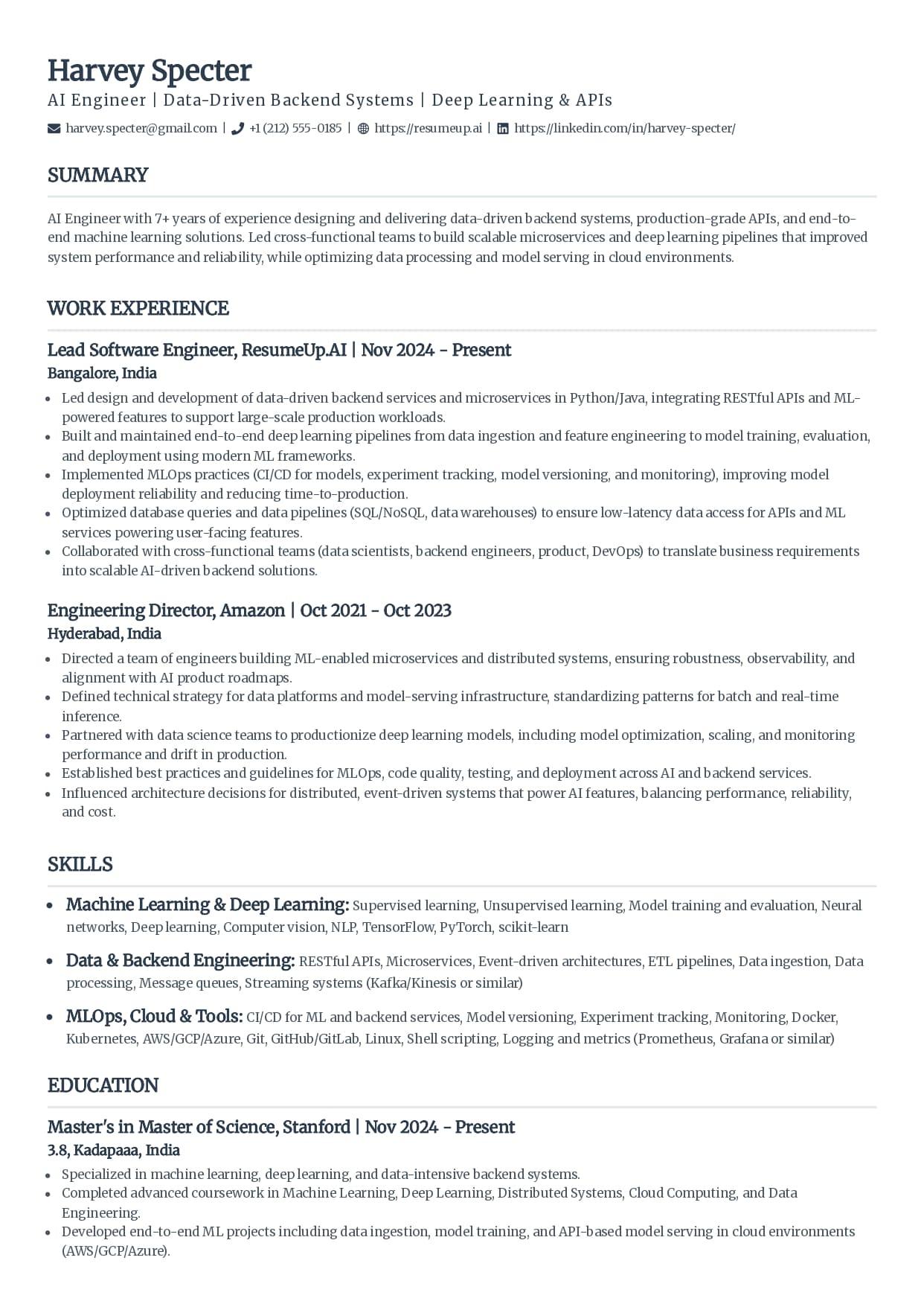
Classic
The single-column standard recruiters see every day.
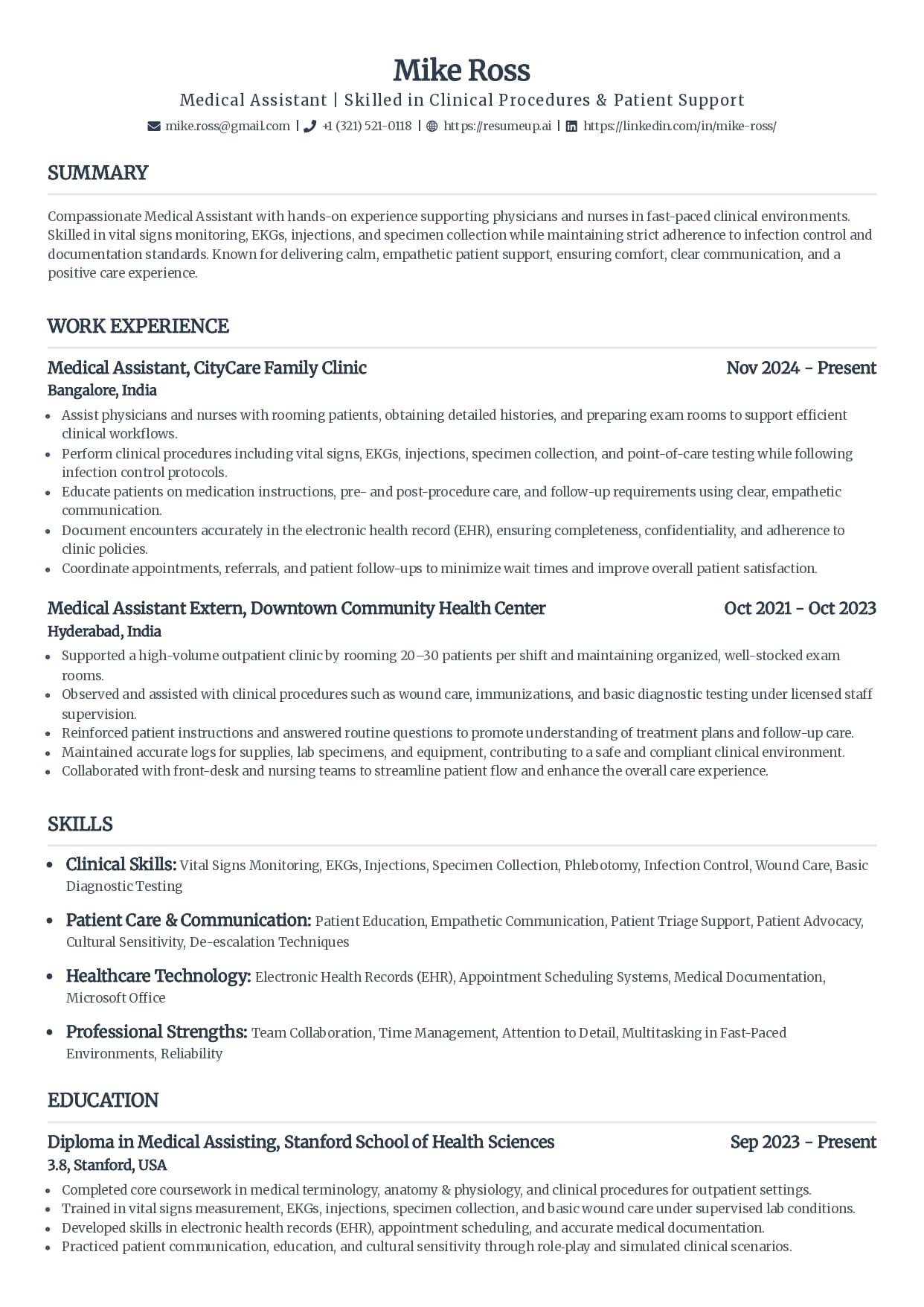
Standard
Clean serif headings with clear section rules.
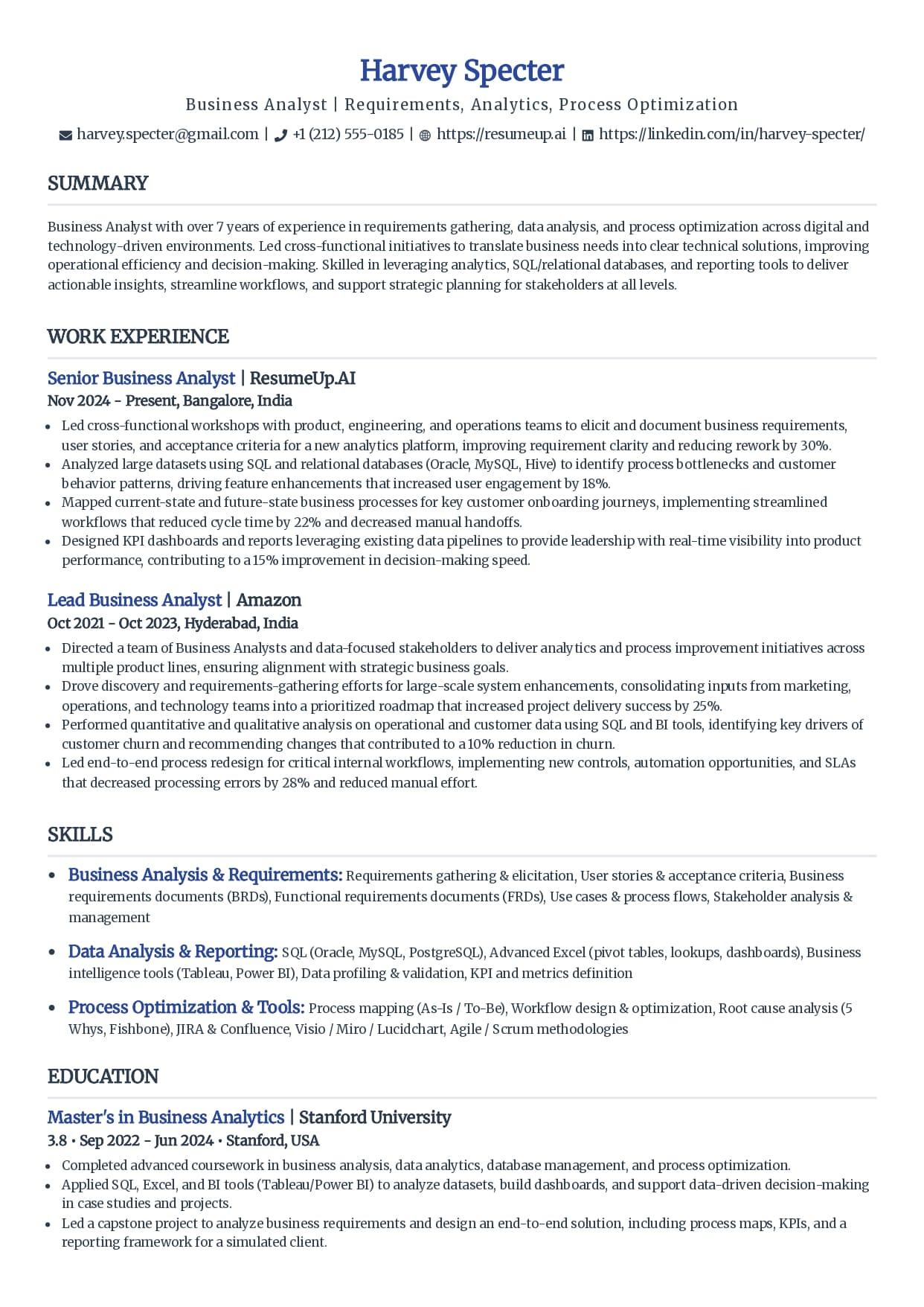
Simple
Minimal styling that keeps every line readable.
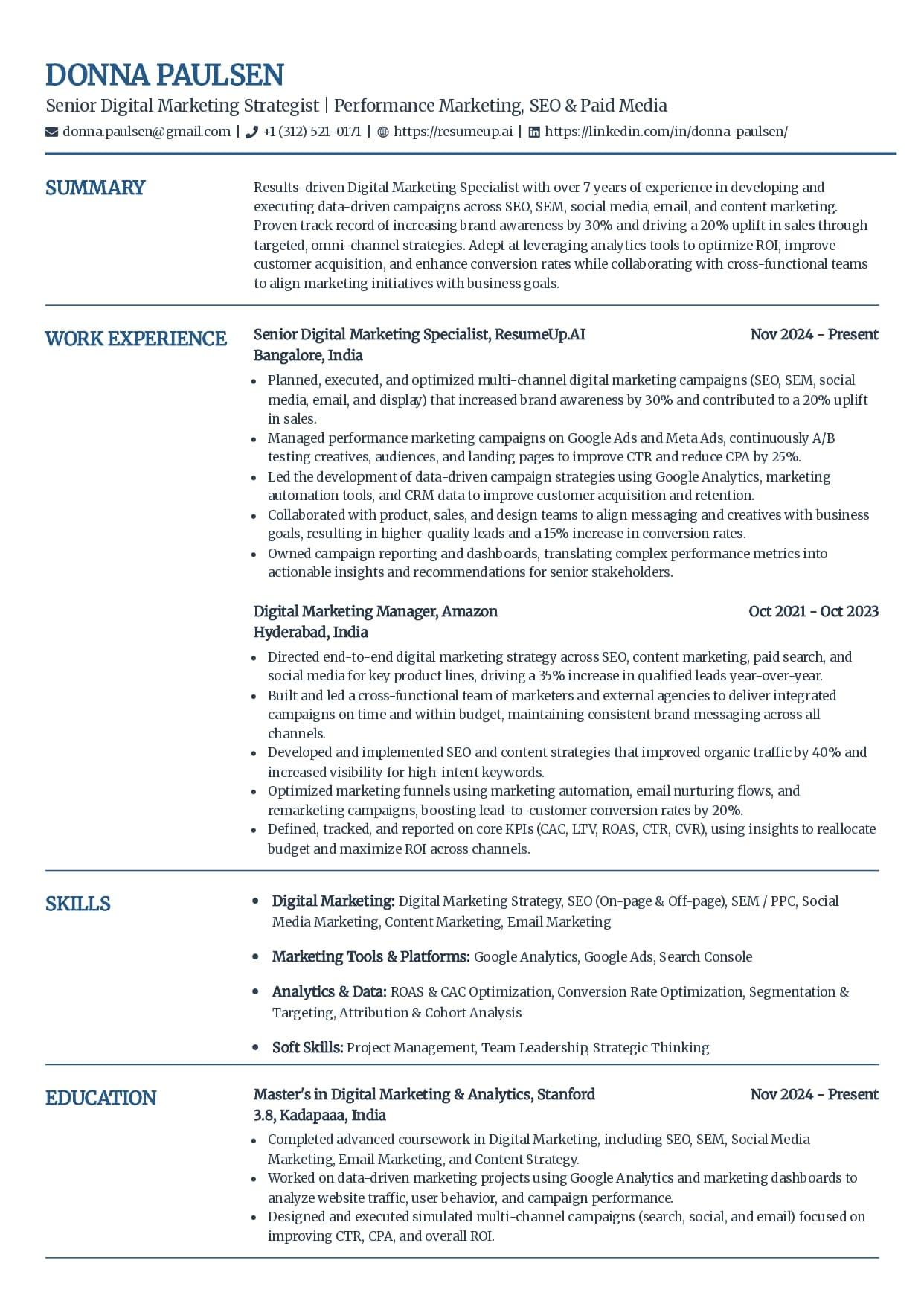
Craft
A subtle touch of color without breaking parsing.
See why these templates parse cleanly
Free ATS-friendly templates are included. Whichever you choose, your resume exports as a text-based PDF or DOCX that parses cleanly, and you can confirm it with the free checker before you apply.
How to Test That Your Resume Is ATS-Friendly
Read your resume the way the software will, not the way it looks in your PDF viewer. Two checks do it, and both are free.
The 10-second check
The highlight test
Open your file and drag your cursor to select everything. Anything that does not highlight is a graphic a parser cannot read: a name in a logo, a skill bar, a photo. If your contact details or a whole section will not select, the software gets nothing from them either.
The real read
The free parser and checker
Upload the finished file to the free ATS parser and read the exact text it pulls, in the order the software reads it. Then the checker scores it out of 100 across 30+ checks. Fix what comes back empty or scrambled, re-check, and apply knowing how it reads.
For the format side of this in more depth, the guide to the ATS resume format shows a two-column layout parsing into gibberish next to a clean single-column one, and the breakdown of what makes a resume ATS-friendly walks each criterion on its own. For the two tests laid out step by step, see how to check if your resume is ATS-friendly.
Why Trust This
Written From the Hiring Side
I have searched a pile of applicants inside an applicant tracking system and watched strong people sit low in the ranking because their resume parsed badly, not because they were unqualified. The order in this guide is the order I would fix a resume in myself: layout first, wording second, then prove it. I now build the tools that show job seekers what that software sees, so they can catch the problem before a recruiter does.
Who wrote this
Rohith Reddy Jarugu, builder of ats resume checker. Ten years in software hiring, 500+ interviews conducted, now building career tools full time. LinkedIn
Build It, Then Prove It
The steps get you an ATS-friendly resume. These free tools show you it worked, before you stake an application on it. No signup.
ATS Resume Parser
FreeUpload your file and see the exact fields and text an ATS extracts. The fastest way to catch a section that reads back empty.
Preview my parseATS Resume Checker
FreeGet a 0-100 score and a 30+ check report in under 60 seconds, covering parsing, sections, and content, so you know what to fix next.
Check my resumeResume Keyword Scanner
FreePaste a job posting and see your keyword match rate. This is step four made measurable, one application at a time.
Scan against a jobATS Resume Templates
FreeSingle-column by design, so the two-column trap that sinks so many resumes never happens to yours.
Browse templatesFree ATS Resume Checker
See If Your Resume Actually Parses
Upload your file and read the exact text an ATS pulls from it, then get a 0-100 score and the 30+ check report behind it. Free, no signup, under 60 seconds.
Making a Resume ATS-Friendly: FAQs
The questions people ask once a good-looking resume still gets no replies. Still stuck? Contact us and we'll help.
How do I make my resume ATS-friendly?
Build it in one column, use standard section headings like Work Experience and Skills, list your jobs in reverse-chronological order, mirror the keywords in the job posting where you honestly match them, keep every word as real selectable text, and export a text-based PDF or DOCX. Then test the finished file with a free ATS checker, because the only way to know it parses is to read it the way the software does.
What makes a resume not ATS-friendly?
The layout, almost always before the words. Two columns, tables, text boxes, graphics, skill bars, contact details stuck in the header, creative section headings, and text baked into an image are the things that break parsing. Each one either scrambles your content or drops it, so a section you can see reads back empty to the software.
Does an ATS-friendly resume get you auto-rejected if you get it wrong?
Rarely. An ATS ranks and filters resumes so a recruiter can work through them in order; it does not delete yours for a formatting mistake. A resume that parses badly is not rejected, it ranks low and never surfaces in the recruiter's search. The only true auto-reject is a knockout question a person set up, like work authorization or a required license.
How many keywords should an ATS-friendly resume have?
There is no target count, and chasing one backfires. Use the skills, tools, and titles the posting names wherever your real experience supports them, phrased naturally inside your bullets and skills section. Stuffing a list with terms you cannot speak to, or hiding keywords in white text, gets flagged by a recruiter and does not help your rank.
Is a PDF or Word document better for an ATS?
Both parse well in modern systems as long as the file is real text, not a scanned image. DOCX is the safest default for older software, and a text-based PDF is fine almost everywhere else. The rule that ends the debate: if the posting names a file type, send that one, and test the finished file either way.
How do I test if my resume is ATS-friendly?
Read it the way the software does. First try the highlight test: open your file and drag to select the text. Anything that does not highlight is a graphic a parser cannot read. Then upload the file to a free ATS parser and checker, look at the fields and text it pulls and the score it returns, and fix anything that comes back empty or scrambled before you apply.
Do I need a different ATS-friendly resume for every job?
Not a new format, but new keywords. The single-column layout and standard headings stay the same for every application. What changes is the wording: an ATS ranks your resume against each specific posting, so tailor your skills section and recent bullets to the role, and check your match rate with a free keyword scanner before you send it.
Keep Reading
ATS Resume Format
The single-column, reverse-chronological layout an ATS parses cleanly, shown next to one it scrambles, with an element-by-element checklist and a free way to test your file.
Read the guideWhat Is an ATS-Friendly Resume?
The five criteria that make a resume ATS-friendly, why a clean format does not guarantee a pass, and two quick tests to check your own file before you apply.
Read the guide